
Choosing the best HOTAS setup for flight sims involves balancing realism, build quality, and affordability. The Thrustmaster Warthog stands out as the top choice for serious sim pilots thanks to its durability and authentic feel. For those on a budget, the Thrustmaster T16000M FCS offers great performance without breaking the bank. Meanwhile, the Logitech G X56 strikes a balance with extensive controls and RGB lighting for immersive gameplay. The main tradeoffs involve price versus realism and complexity, so continue reading for a detailed breakdown of the options that best match your needs.
Key Takeaways
- The top-tier models like the Thrustmaster Warthog provide unmatched durability and realism but come at a premium price.
- Budget-friendly options such as the T16000M FCS deliver solid performance for casual or new flight sim enthusiasts.
- Customizability and programmable controls are key features for more advanced users seeking a tailored experience.
- Build quality and materials vary widely, with metal components generally offering greater longevity and feel.
- Compatibility across platforms and additional accessories like rudder pedals can influence the overall setup and cost.




More Details on Our Top Picks
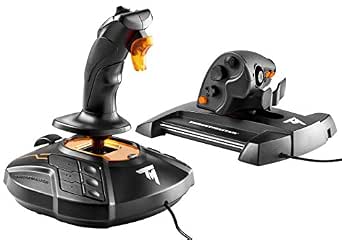
Thrustmaster T16000M FCS HOTAS (Compatible with PC)
The Thrustmaster T16000M FCS offers an impressive array of features at a price point that makes it accessible for newcomers to flight sims. Compared with higher-end setups like the Thrustmaster HOTAS Warthog, it sacrifices some build quality and advanced customization, but provides excellent precision thanks to its Hall effect magnetic sensors. Its 16 action buttons and multiple axes ensure versatility, making it suitable for a range of flight games. The main tradeoff is durability; the plastic construction doesn’t match the Warthog’s metal robustness, and long-term wear might be a concern. Still, for someone starting out or on a budget, it delivers high responsiveness and a comfortable feel without breaking the bank.
Pros:- Excellent accuracy due to Hall effect sensors
- Affordable price point for entry-level users
- Multiple programmable buttons and axes for versatility
Cons:- Constructed primarily from plastic, affecting durability
- Throttle has a noticeable mid-point stiffness that can hinder smooth operation
Best for: Beginner flight sim enthusiasts seeking a reliable, affordable HOTAS with great precision.
Not ideal for: Advanced sim pilots or those wanting a premium, long-lasting setup with extensive customization options.
- Compatible Devices:PC
- Controller Type:Flight Stick
- Connectivity Technology:USB
- Additional Features:16 action buttons, magnetic sensors, programmable axes
- Power Source:Corded
- Item Dimensions:9.01 x 10.39 x 10.7 inches
Bottom line: This HOTAS makes the most sense for newcomers or casual players who want quality control without high costs.
Thrustmaster HOTAS Warthog Flight Stick and Throttle – Metal Dual Throttle System
The Thrustmaster HOTAS Warthog stands out for its authentic build and exceptional precision, inspired directly by U.S. Air Force controls. It surpasses the Thrustmaster T16000M in durability, thanks to its all-metal construction and contactless Hall effect sensors, which guarantee long-lasting accuracy. With 55 programmable controls and a dual throttle system, it provides a level of customization suited for serious combat flight enthusiasts and professionals. The main tradeoff is its size and weight; at over 13 pounds, it requires a dedicated space and is less portable. But if you’re seeking an ultra-realistic, high-fidelity experience, this HOTAS offers unmatched control and durability.
Pros:- Authentic replica of U.S. Air Force controls
- Durable all-metal construction for longevity
- Extensive programmable controls for customization
Cons:- Very heavy and bulky, requiring dedicated setup space
- High price point may be prohibitive for casual users
Best for: Professional or highly dedicated flight sim pilots demanding ultimate realism and durability.
Not ideal for: Casual players or those with limited space due to its large size and weight.
- Compatible Devices:PC
- Controller Type:Flight Stick and Throttle
- Connectivity Technology:USB
- Additional Features:55 programmable buttons, Hall effect sensors, dual throttle
- Item Dimensions:18.11 x 9.84 x 12.6 inches
- Weight:13.2 pounds
Bottom line: This HOTAS is best suited for serious enthusiasts who want the most authentic and durable military-grade control system.
Thrustmaster T-Flight Hotas X (Compatible with PC)
The Thrustmaster T-Flight Hotas X offers a solid mix of features at an accessible price, making it ideal for casual gamers or those new to flight sims. Its large, ergonomic design and 12 programmable buttons give enough control for most civil and light combat flight games. While it doesn’t feature the advanced magnetic sensors or extensive customization of pricier models like the X56, it provides a responsive and comfortable experience. The main tradeoff is the limited build quality; the plastic components and simpler mechanism may not withstand heavy or long-term use as well as more premium setups. Nonetheless, it’s a great starter HOTAS that balances cost and functionality.
Pros:- Affordable price point
- Ergonomic, large hand-rest for comfort
- Fully programmable buttons and axes
Cons:- Plastic construction limits durability
- Less precise sensors compared to higher-end models
Best for: Casual flight sim players or beginners looking for an easy-to-use, affordable HOTAS system.
Not ideal for: Serious sim pilots seeking high-precision controls or extensive programmability.
- Compatible Devices:PC
- Controller Type:Flight Stick
- Connectivity Technology:USB
- Additional Features:12 programmable buttons, adjustable resistance
- Item Dimensions:10.39 x 9.53 x 10.43 inches
- Weight:2.165 pounds
Bottom line: This HOTAS is perfect for newcomers or casual players who want a comfortable, programmable control system without a hefty price tag.
Logitech G X56 H.O.T.A.S Throttle and Joystick Flight Simulator Game Controller
The Logitech G X56 delivers a highly adjustable and feature-rich experience, with 189 programmable controls and RGB lighting that can be synchronized with your setup. Its 16-bit sensors and 6 degrees of freedom provide precise control, making it a step above the Thrustmaster T-Flight X in terms of customization and fidelity. The adjustable spring system allows for tailored resistance, and the twin throttles support complex maneuvers. The main drawback is its size and complexity; it’s best suited for advanced users who want deep customization. Its power draw and setup complexity might be overkill for casual players, but for dedicated flight simmers, it’s a versatile, high-tech option.
Pros:- 189 programmable controls for deep customization
- RGB lighting for aesthetic integration
- Accurate sensors with 6 degrees of freedom
Cons:- Complex setup and programming learning curve
- Hefty size and power requirements
Best for: Experienced flight sim enthusiasts wanting extensive programmable controls and customizable feedback.
Not ideal for: Entry-level or casual gamers who prefer a simpler, plug-and-play setup.
- Compatible Devices:PC
- Controller Type:Joystick and Throttle
- Connectivity Technology:USB
- Additional Features:189 programmable controls, RGB lighting, 6 degrees of freedom
- Item Dimensions:7.28 x 8.86 x 3.54 inches
- Weight:6.92 pounds
Bottom line: This HOTAS is ideal for dedicated pilots who want maximum control customization and visual integration in their sim setup.
Thrustmaster T-Flight Hotas One Flight Stick Controller for PC & Xbox Series X|S
The Thrustmaster T-Flight Hotas One provides a balanced experience for both PC and Xbox players, with a realistic design and a detachable throttle. Its ergonomic layout and responsive trigger make it suitable for a wide range of flight sims, from casual aviation to combat. Unlike the Logitech X56, it’s simpler to set up and more portable, making it a good choice for those who want flexibility across platforms. The main limitation is the fewer programmable buttons—24 compared to the X56’s 189—and the lack of advanced features like RGB lighting. However, for a plug-and-play, versatile HOTAS that works seamlessly on multiple systems, it hits the sweet spot for many.
Pros:- Compatible with PC and Xbox Series X|S
- Detachable throttle for flexible setup
- Responsive, adjustable resistance for comfort
Cons:- Fewer programmable buttons than premium models
- Basic lighting options with limited customization
Best for: Flight sim players who want a reliable, multi-platform HOTAS for both PC and Xbox without extensive customization needs.
Not ideal for: High-end simulation enthusiasts seeking maximum programmability and advanced feedback features.
- Compatible Devices:PC, Xbox Series X|S
- Controller Type:Flight Stick
- Connectivity Technology:USB
- Additional Features:Detachable throttle, adjustable resistance
- Item Dimensions:10.39 x 9.53 x 10.43 inches
- Weight:2.165 pounds
Bottom line: This HOTAS offers great value and flexibility for casual and multi-platform players who want a realistic experience without complexity.
Thrustmaster T16000M FCS Flight Pack (Compatible with PC)
This flight pack stands out for offering a highly precise and customizable control experience at an accessible price point, making it ideal for serious flight sim enthusiasts who want more than a basic joystick. Compared to the Logitech X52 Pro, the T.16000M FCS provides greater accuracy thanks to its HallEffect technology, though it lacks the built-in LCD display and extensive button array of the X52 Pro. The ambidextrous design and software profile creation allow tailored setups for each user, but the plastic build can feel less durable over long-term heavy use. The controls are sensitive and responsive, translating to better handling in-flight maneuvers, yet the lightweight construction may cause stability issues on uneven surfaces. If you’re seeking a precise, customizable, and affordable HOTAS experience for PC flight sims, this pick makes the most sense, especially for those comfortable with some minor setup quirks.
Pros:- High-precision HallEffect sensors ensure consistent accuracy.
- Fully ambidextrous and customizable for left or right-handed use.
- Supports profile creation and game-specific mappings via T.A.R.G.E.T software.
Cons:- Plastic construction feels less durable for heavy or prolonged use.
- Controls can shift or move if pressed too hard, affecting stability.
Best for: Advanced PC flight sim players who prioritize precision and customization on a budget.
Not ideal for: Beginners seeking a plug-and-play setup or users wanting a more durable, all-in-one control system.
- Compatible Devices:PC
- Controller Type:Flight Stick
- Connectivity Technology:USB
- Button Quantity:16
- Hardware Platform:PC
- Power Source:Corded Electric
- Item Dimensions:12″D x 16.5″W x 17″H
- Item Weight:3 Pounds
Bottom line: This setup is perfect for experienced PC flight sim enthusiasts who want precise controls without a high price tag.
Logitech G Saitek X52 Pro Flight Control System, Controller and Joystick Simulator, LCD Display, Illuminated Buttons, 2xUSB, PC – Black/Silver
This flight system makes the list for blending advanced features like an LCD display, extensive programmable buttons, and a capable throttle, making it ideal for dedicated flight sim pilots. Unlike the Thrustmaster T16000M, the X52 Pro offers a more immersive control experience with its multi-function display and illumination, which is especially useful in low-light conditions. The precision centering mechanism and detents give a realistic feel, and the programmable software allows tailored profiles for each aircraft or game. However, the large number of controls can be overwhelming for beginners, and the build quality, while solid, is heavier and less portable. The LCD display provides real-time data feedback, but its low framerate can limit its usefulness during fast-paced gameplay. Overall, this is suited for users who want a comprehensive, feature-rich HOTAS system for serious flight simulation, especially if they prioritize realism and customization.
Pros:- Large, customizable multi-function LCD display for real-time data.
- Illuminated buttons and detailed detents enhance low-light usability.
- Extensive programmable controls for tailored aircraft profiles.
Cons:- Relatively heavy and bulky, less portable for quick setups.
- Low framerate on the LCD can hinder real-time feedback during fast maneuvers.
Best for: Hardcore flight sim enthusiasts who want realistic controls with advanced features for PC.
Not ideal for: Casual players or newcomers who prefer a simpler, more straightforward setup.
- Compatible Devices:PC
- Controller Type:Joystick and Throttle
- Connectivity Technology:USB
- Button Quantity:16
- Hardware Platform:PC
- Power Source:Corded
- Item Dimensions:6.7″L x 6.7″W x 10.9″H
- Item Weight:2.3 Pounds
Bottom line: This system is ideal for dedicated flight sim pilots who demand feature-rich, realistic controls with extensive customization options.
Logitech G X52 Flight Control System – Standard Packaging
The X52 provides a significant upgrade from entry-level joysticks with its advanced multi-function display, precise centering, and detents for throttle control, making it suitable for pilots transitioning to more realistic flight experiences. Unlike the Thrustmaster T-Flight Hotas X, the X52 offers a more sophisticated control set with dedicated rotary dials and a detailed display. The sturdy build and multiple buttons support complex maneuvers, but its design can be a bit bulky, and the lack of modularity limits customization. The throttle’s tension adjustment and detents improve control fidelity, though some users find the control layout less intuitive initially. For those wanting a step up from basic controllers, especially with a focus on realism in PC flight sims, this system fits well, provided space isn’t a concern.
Pros:- Advanced multi-function display for real-time information.
- Precise centering mechanism and detents for accurate throttle control.
- Multiple programmable switches and rotary dials for customization.
Cons:- Bulky design may take up considerable desk space.
- Limited modularity and upgrade options.
Best for: Pilots upgrading from basic controllers seeking enhanced realism and control for PC flight sims.
Not ideal for: Complete beginners or users seeking lightweight, portable setups.
- Compatible Devices:PC
- Controller Type:Joystick and Throttle
- Connectivity Technology:USB
- Button Quantity:14
- Hardware Platform:PC
- Power Source:Corded
- Item Dimensions:6.7″L x 6.7″W x 10.9″H
- Item Weight:2.3 Pounds
Bottom line: Ideal for mid-level flight sim players looking for a realistic, feature-rich upgrade over entry-level joysticks.
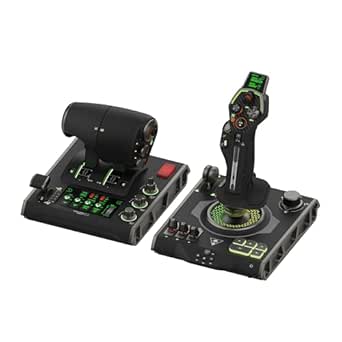
This system earns its place for delivering a comprehensive, ultra-immersive HOTAS experience with a flight touch display, extensive programmable controls, and hall-effect sensors, making it perfect for advanced flight and space sim fans. Unlike the more traditional systems like the Thrustmaster Warthog, the VelocityOne Flightdeck integrates a full-color touch display and OLED HUD, providing real-time data and customization on the fly, elevating the flight simulation to a new level. The modular, dual-control setup with 139 programmable functions allows detailed control over complex aircraft or spacecraft systems, but its size and weight make it less suitable for casual or portable use. The hall-effect sensors ensure high durability and precision, ideal for long-term, rigorous use. For the most demanding sim enthusiasts who want maximum realism and customization, this picks makes a compelling case, especially with future-proof features like the Flight Hangar app.
Pros:- Full-color touch display and OLED HUD for real-time info and customization.
- 139 programmable controls with hall-effect sensors for durability and precision.
- Modular design with adjustable height and remappable buttons for personalized setups.
Cons:- Large and heavy, not suitable for quick setup or transport.
- Complex configuration may require time to learn and set up properly.
Best for: Elite-level flight and space sim enthusiasts who demand ultimate customization and immersion on PC.
Not ideal for: Casual players or those with limited space for large, high-end systems.
- Compatible Devices:PC, Windows 10 & 11
- Controller Type:Joystick & Throttle
- Connectivity Technology:USB
- Button Quantity:139
- Hardware Platform:Desktop, PC
- Item Dimensions:6.93″ x 20.63″ x 10.04″
- Item Weight:9.4 lbs
- Warranty:Limited
Bottom line: This system is a top-tier choice for hardcore flight and space sim fans seeking maximum realism and customization on PC.
This system earns its place for delivering a comprehensive, ultra-immersive HOTAS experience with a flight touch display, extensive programmable controls, and hall-effect sensors, making it perfect for advanced flight and space sim fans. Unlike the more traditional systems like the Thrustmaster Warthog, the VelocityOne Flightdeck integrates a full-color touch display and OLED HUD, providing real-time data and customization on the fly, elevating the flight simulation to a new level. The modular, dual-control setup with 139 programmable functions allows detailed control over complex aircraft or spacecraft systems, but its size and weight make it less suitable for casual or portable use. The hall-effect sensors ensure high durability and precision, ideal for long-term, rigorous use. For the most demanding sim enthusiasts who want maximum realism and customization, this picks makes a compelling case, especially with future-proof features like the Flight Hangar app.
Pros:- Full-color touch display and OLED HUD for real-time info and customization.
- 139 programmable controls with hall-effect sensors for durability and precision.
- Modular design with adjustable height and remappable buttons for personalized setups.
Cons:- Large and heavy, not suitable for quick setup or transport.
- Complex configuration may require time to learn and set up properly.
Best for: Elite-level flight and space sim enthusiasts who demand ultimate customization and immersion on PC.
Not ideal for: Casual players or those with limited space for large, high-end systems.
- Compatible Devices:PC, Windows 10 & 11
- Controller Type:Joystick & Throttle
- Connectivity Technology:USB
- Button Quantity:139
- Hardware Platform:Desktop, PC
- Item Dimensions:6.93″ x 20.63″ x 10.04″
- Item Weight:9.4 lbs
- Warranty:Limited
Bottom line: This system is a top-tier choice for hardcore flight and space sim fans seeking maximum realism and customization on PC.
Thrustmaster Sol-R2 HOSAS, Hall Effect Technology for Ultra-Precise Gaming, 88 buttons Ideal for Space Flight Simulation (compatible with PC)
This pick stands out for its ultra-precise Hall Effect sensors that deliver 16-bit accuracy across 6 axes, making it ideal for detailed spaceship control. Compared with the Logitech G PRO Flight Yoke, which offers realistic aircraft feel but less space simulation-specific customization, the Sol-R2 excels in its extensive button count and ambidextrous design, perfect for complex space sims. The inclusion of 88 buttons and multifunction controls means you can assign virtually every command, but this complexity may overwhelm beginners or casual players. Its compatibility with Thrustmaster ecosystem allows for future expandability, though the setup demands a steeper learning curve and more desk space. The detachable grips and backlit design enhance usability and immersion, yet the sheer number of controls could lead to accidental presses if not configured carefully. Overall, this is best suited for dedicated space sim enthusiasts who prioritize precision and customization over simplicity.Pros:- Exceptional 16-bit accuracy with Hall Effect sensors for precise control
- 88 fully programmable buttons allow comprehensive command setup
- Detachable ambidextrous grips for ergonomic comfort and customization
- Backlit joysticks for enhanced visibility in low-light gaming environments
Cons:- High complexity can be daunting for beginners
- Requires significant desk space and setup time
- Premium price point may be prohibitive for casual users
Best for: Hardcore space flight sim players who want maximum control and customization.
Not ideal for: Casual gamers or those new to flight sims who prefer a straightforward, plug-and-play setup.
- Compatible Devices:PC
- Controller Type:HOSAS
- Connectivity Technology:USB
- Button Quantity:88
- Weight:2539 grams
- Item Dimensions:9.45 x 11.1 x 8.94 inches
Bottom line: This HOTAS is perfect for dedicated space sim pilots who need intricate control and are comfortable with a complex setup.
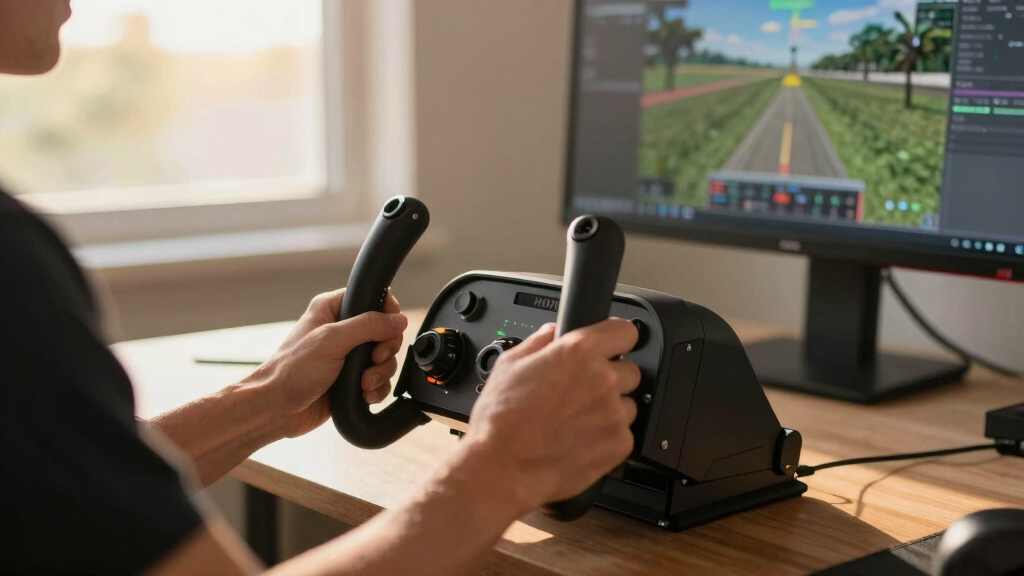
Logitech G PRO Flight Yoke System, Professional Simulation Yoke and Throttle Quadrant, 3 Modes, 75 Programmable Controls, Configurable Knobs, Steel Shaft, USB, PC – Black
The Logitech G PRO Flight Yoke System earns its place for delivering a highly realistic flying experience with its sturdy steel shaft and comprehensive controls, making it ideal for those transitioning from beginner setups like the Thrustmaster T-Flight Hotas X. While the T-Flight offers a more straightforward joystick experience, the G PRO Yoke provides tactile, accurate control suited for both light aircraft and complex simulations, thanks to its 75 programmable controls and configurable knobs. Its modular clamp system ensures stability across various desks, though its size and weight may be cumbersome for smaller setups. The system’s compatibility with major flight sims like Microsoft Flight Simulator enhances realism, but some users may find the learning curve steep due to the number of controls. This makes it an excellent choice for serious flight enthusiasts seeking a more authentic cockpit feel.Pros:- Sturdy construction with a steel shaft for durability and precise control
- 75 customizable controls for tailored flight experiences
- Configurable knobs and modes enhance versatility across aircraft types
- Provides authentic full-sized yoke feel for immersive flying
Cons:- Large footprint may not suit limited desk space
- Higher price compared to entry-level controllers
- Requires software setup for full customization
Best for: Intermediate to advanced flight sim enthusiasts seeking aircraft realism and extensive control options.
Not ideal for: Beginners or casual players looking for a simple, space-saving controller.
- Compatible Devices:Windows
- Controller Type:Yoke and Throttle
- Connectivity Technology:USB
- Programmable Controls:75
- Material:Steel Shaft
- Item Dimensions:18.9 x 15.8 x 9.1 inches
Bottom line: This yoke system is best for pilots who want a realistic, fully customizable flying experience and are ready for a more involved setup.
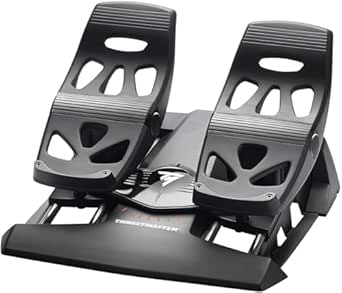
Thrustmaster TFRP Flight Rudder Pedals – Realistic Flight Simulator Controls with Sliding Rail System for Smooth Precision – Compatible with PS5, Xbox Series X|S & PC
This set of rudder pedals makes a compelling case for players who need smooth, precise foot control to replicate real aircraft handling, especially when compared to simpler pedals like the Thrustmaster T-Flight Hotas X. The TFRP Pedals feature a robust sliding rail system that ensures frictionless movement and consistent responsiveness, making them ideal for long, demanding flight sessions. The self-centering mechanism provides resistance for realistic steering, but the overall size and weight could be an issue for smaller or more compact cockpits. The pedals’ compatibility with multiple platforms, including PS5, Xbox Series X|S, and PC, offers versatility, though setup might require additional space and secure mounting. The high-quality build and attention to detail justify the higher price point, particularly for serious simmers seeking ultimate control fidelity.Pros:- Smooth, friction-free sliding system for precise rudder control
- Self-centering axis with resistance mimics real aircraft pedals
- Durable construction with aluminum rails for longevity
- Universal compatibility with PS5, Xbox Series X|S, and PC
Cons:- Bulkier and heavier than standard pedals, requiring ample space
- Requires secure mounting for best stability
- Price may be high for casual users
Best for: Aviation enthusiasts who want authentic pedal feedback and long-term durability for serious simulation.
Not ideal for: Casual players or those with limited space who prefer more compact or less heavy controls.
- Compatible Devices:PS5, Xbox Series X|S, PC
- Control Type:Rudder Pedals
- Travel Range:Long range for smooth turns
- Material:Aluminum rails
- Self-centering:Yes
- Dimensions:Standard size with sliding rail system
Bottom line: This rudder pedal set is ideal for pilots who prioritize realistic foot controls and long-lasting build quality.

How We Picked
The products in this roundup were evaluated based on performance, build quality, versatility, and user experience. Preference was given to models offering precise control, durability, and adjustable features that enhance realism. We also considered value for money, ensuring options cater to different budgets without sacrificing essential functionality. Products were ranked by how well they balance these factors, with particular attention to features that improve immersion and ease of setup for a variety of flight sim enthusiasts.Factors to Consider When Choosing Best HOTAS Setups For Flight Sims
When selecting a HOTAS setup for flight sims, it’s vital to consider several key factors that influence your overall experience. Beyond raw features, understanding your specific needs and budget can help narrow down the best options. High-end models often offer superior precision and durability but come with a higher price tag, while entry-level setups might lack some advanced controls but are easier to learn and more affordable. Keep in mind that compatibility with your platform and future expandability also play important roles in making a satisfying investment.Performance and Precision
High-quality HOTAS systems should deliver smooth, responsive controls that accurately reflect your inputs. Hall effect sensors or similar technology can significantly improve precision, especially for space or combat flight sims that demand fine control. Cheaper models may rely on potentiometers, which can introduce jitter and inconsistency over time. Prioritize models with adjustable tension and customizable dead zones to fine-tune your experience, especially if you plan on long, immersive sessions.
Build Quality and Materials
Durability depends heavily on the materials used. Metal components, especially in the sticks and throttle quadrants, offer a more realistic feel and longer lifespan. Some budget options may incorporate plastic parts that wear faster or feel less substantial. Consider your environment—if you fly frequently or use your setup intensively, investing in a robust, well-constructed HOTAS will save money in replacements and repairs over time.
Customizability and Controls
Look for systems with programmable buttons, switches, and axes, allowing you to tailor controls to your preferred flight style. More advanced setups provide extensive software customization, which can be a boon for complex simulation scenarios. However, more controls can also mean a steeper learning curve and increased complexity. If you’re new to flight sims, a simpler layout might be more approachable while still offering room to grow.
Compatibility and Expandability
Ensure your HOTAS setup works with your preferred platform—PC, Xbox, or both—and check for compatibility with additional accessories like rudder pedals or throttle quadrants. Some systems are modular, allowing you to upgrade or expand your controls later, which can be cost-effective. Avoid models that lock you into proprietary software or hardware ecosystems if you foresee expanding your setup in the future.
Price and Value
Balancing features against cost is key. Premium setups offer unmatched realism and durability but may be overkill for casual players. Conversely, lower-cost models provide a decent experience for beginners or occasional players but might lack longevity or advanced features. Consider your long-term plans: investing more initially can pay off if you’re committed to serious simulation, while a budget option can suffice if you’re just starting out or fly casually.