

Finding the best AMD graphics card for Linux users can be challenging, especially with varying driver support and hardware compatibility. The AMD Radeon RX 580 stands out as the overall best choice for its solid Linux driver support and gaming performance. For entry-level needs, the AMD Radeon R5 220 offers low power consumption and affordability, while the AMD Radeon Pro WX 3200 caters to professional workflows. The main tradeoffs involve balancing raw power, driver stability, and price. Continue reading for a full breakdown of these options to help you make an informed decision.
Key Takeaways
- The top-performing cards generally offer better Linux driver support and gaming capabilities, but come at higher costs.
- Entry-level options like the Radeon R5 series are suitable for basic tasks and HTPC use but lack gaming or heavy workflow support.
- Professional cards such as the Radeon Pro WX 3200 excel in workstation tasks but may be limited for gaming or casual use.
- Low-profile and SFF cards are available for small form factor builds, but their performance tiers are often limited.
- Price and performance do not always align; investing more often yields better Linux compatibility and longevity.




More Details on Our Top Picks
maxsun AMD Radeon R5 220 2GB Graphics Card GPU (DVI-I, HDMI, VGA) – Low Profile Ready
This maxsun AMD Radeon R5 220 stands out as a budget-friendly option for Linux users with low-performance needs. Compared with the Glorto Radeon HD 5450, it offers similar basic output options but is designed for low-profile setups, making it ideal for small form factor systems. While it handles simple desktop tasks and older Linux distributions with integrated or basic drivers, it’s not suitable for gaming or intensive workloads due to its entry-level performance. The passive cooling and low power consumption make it quiet and energy-efficient, but its limited 2GB GDDR3 memory restricts modern multimedia or gaming use. The card’s plug-and-play nature ensures easy installation on compatible Linux distributions, though driver support may require manual setup on newer kernels. This pick makes the most sense for Linux users needing a reliable, low-cost display upgrade for office or HTPC use, not for demanding graphics work.
Pros:- Very affordable for basic Linux display needs
- Low power consumption with passive cooling
- Easy to install with plug-and-play support
Cons:- Limited to 2GB GDDR3 memory, restricting multimedia performance
- Inadequate for gaming or GPU-intensive applications
- Driver support may be limited on newer Linux kernels
Best for: Linux users with basic display needs on small or legacy systems who prioritize affordability and simplicity.
Not ideal for: Users wanting to run modern games or perform GPU-accelerated tasks, as this card lacks the processing power and driver support for such workloads.
- Graphics Coprocessor:R5 220
- Memory Ram Type:GDDR3
- Video Output Interface:DVI, HDMI, VGA
- Graphics Ram:2 GB
- Memory Clock Speed:1000 MHz
- Maximum Display Resolution:1920×1080
- Interface:PCI-Express x16
- Built-In Media:Passive cooling
- Warranty:3 years
Bottom line: This card is best suited for Linux users seeking a no-frills, budget-friendly display solution for office tasks or media playback.
Glorto Radeon HD 5450 1GB DDR3 Low Profile Graphics Card, PCI Express 2.0 x16, HDMI/VGA/DVI, Entry Level GPU for PC, SFF and HTPC
The Glorto Radeon HD 5450 offers a step up in multimedia capability with 1GB GDDR3 memory and support for resolutions up to 2560×1600, making it suitable for basic Linux desktop environments and media playback. Unlike the maxsun R5 220, it boasts a slightly higher maximum resolution and hardware support for DirectX 11 and OpenGL 4.5, which broadens compatibility with older Linux drivers and multimedia libraries. Its low-profile form factor fits well in small form factor and HTPC builds, though driver support on recent Linux kernels may be limited, especially on Windows 11. Its 625MHz core clock provides basic acceleration but falls short for gaming or GPU-accelerated workloads. The card’s simple setup and broad Linux driver support on older kernels make it ideal for legacy or budget media systems, but it’s not recommended for modern gaming or graphics-intensive tasks.
Pros:- Supports high resolutions up to 2560×1600
- Low profile and compact for small cases
- Broad compatibility with older Linux distributions
Cons:- Limited 1GB GDDR3 memory restricts multimedia performance
- No driver support for Windows 11; Linux support may be outdated
- Basic performance, unsuitable for gaming or intensive workloads
Best for: Linux users setting up basic multimedia or office systems on legacy hardware who need reliable video output.
Not ideal for: Gaming enthusiasts or users needing GPU acceleration for modern applications, due to its older architecture and limited driver support.
- Graphics Coprocessor:HD 5450
- Memory Ram Type:GDDR3
- Video Output Interface:HDMI, VGA, DVI
- Graphics Ram:1 GB
- Maximum Resolution:2560×1600
- Interface:PCI-Express 2.0 x16
- Core Clock Speed:625 MHz
- Supported APIs:DirectX 11, OpenGL 4.5
- Warranty:3 years
Bottom line: Best suited for Linux users needing a dependable, entry-level video card for multimedia and basic desktop use on older systems.
AMD Radeon Pro W2100 Graphic Card – 2 GB GDDR5 – Low-profile – Single Slot Space Required
The AMD Radeon Pro W2100 stands out for professional Linux environments, offering 2GB GDDR5 memory and 1500 MHz core clock, suitable for CAD, 3D modeling, and workstation tasks. Compared with the MOUGOL RX 580 or maxsun RX 550, it provides more specialized driver support for professional applications, especially on Linux, with certified drivers for stability and compatibility. Its low-profile, single-slot design makes it ideal for small workstations, although its performance is not geared toward gaming or GPU-heavy tasks. The 2 mini-DisplayPort outputs support multi-monitor setups, making it a solid choice for productivity-focused Linux users. While it’s more expensive than entry-level cards, its Linux-certified drivers and stable performance justify the price for professional workstations, but it’s not suitable for gaming or high-performance GPU workloads.
Pros:- Linux-certified, stable driver support
- Compact low-profile, single-slot design
- Supports multi-monitor setups with Mini-DisplayPort
Cons:- Limited to 2GB GDDR5 memory, restricting large dataset handling
- Higher cost compared to consumer-grade cards
- Not suitable for gaming or GPU-accelerated workloads
Best for: Linux users running professional applications like CAD or 3D modeling on small form factor workstations needing certified drivers.
Not ideal for: Gamers or users seeking high GPU performance for gaming or intensive compute tasks, as this is a workstation-focused card.
- Graphics Coprocessor:Radeon Pro WX 2100
- Memory Ram:2 GB GDDR5
- Video Output Interface:2x Mini-DisplayPort
- Core Clock Speed:1500 MHz
- Maximum Resolution:7680×4320
- Interface:PCI-Express x16
- Warranty:30 days
- Form Factor:Low-profile, Single Slot
Bottom line: This card is perfect for Linux professionals needing reliable, certified workstation graphics in compact systems.
MOUGOL AMD Radeon R7 350 4GB Low Profile Graphics Card, Dual HDMI Ports for Multi-Monitor, 4GB GDDR3 128-Bit, SFF Half-Height Video Card for Slim Desktop PC, Support Windows 10/8.1/7
The MOUGOL R7 350 offers a solid mid-range choice for Linux users with multi-monitor setups, featuring 4GB GDDR3 memory and dual HDMI ports. Compared to the older maxsun R5 220, it provides more memory and multiple HDMI outputs, making it suitable for multi-display office or media systems. Its 800 MHz core clock supports basic acceleration for desktop environments but is not meant for gaming or heavy GPU tasks. The low-profile form factor and no external power requirement make it easy to install in small or legacy systems, though driver support on Linux may require manual or older driver versions. Its 128-bit memory bus enhances stability for multimedia playback and multi-tasking, but overall performance remains limited for gaming or GPU compute tasks. This card is a versatile, affordable option for Linux users with multiple screens or media playback needs, but not for high-end gaming.
Pros:- Supports multi-monitor setups with dual HDMI ports
- Generous 4GB GDDR3 memory for multimedia tasks
- Low profile and easy to install without external power
Cons:- Limited to 800 MHz core clock, restricting gaming performance
- Older architecture with limited driver updates for Linux
- Not suitable for GPU-accelerated workloads
Best for: Linux users needing multi-monitor support for office, media, or multi-tasking environments on small form factor systems.
Not ideal for: Gaming enthusiasts or GPU-intensive applications, as it lacks the processing power and modern driver support.
- Graphics Coprocessor:Radeon R7 350
- Memory Ram Type:GDDR3
- Video Output Interface:2x HDMI
- Memory:4 GB
- Memory Clock Speed:600 MHz
- Maximum Resolution:1920×1080
- Interface:PCI-Express x16
- Bus Width:128-bit
- Warranty:1 Year
Bottom line: This card is well-suited for Linux users who want multi-monitor support and media playback in small or legacy systems.
Radeon HD 6570 Graphics Card, Dual HDMI, 1G GDDR3 64-bit, Video Cards PC, Low Profile, Computer GPU, PCI Express x 16, 60W Low Power, Plug & Play, DirectX 11
The Radeon HD 6570 offers a very affordable option for Linux users with basic display needs, supporting 1080p video and dual HDMI outputs. Compared to the Glorto Radeon HD 5450, it provides a slightly higher core clock at 650 MHz and a broader support for older Linux distributions with its 60W low power profile, making it an excellent upgrade for legacy systems. Its 1GB GDDR3 memory limits multimedia performance but suffices for office applications, streaming, and basic desktop environments. The low-profile design fits into small cases easily, while its support for DirectX 11 and 1920×1080 resolution ensures decent multimedia playback. However, driver support for newer Linux kernels and operating systems is limited, especially as support for this series has been discontinued. It’s ideal for budget-conscious users who need a straightforward, reliable display output for older Linux systems.
Pros:- Very low power draw at 60W and no external power needed
- Dual HDMI outputs support multi-monitor setups
- Compact low-profile design fits in small cases
Cons:- Limited to 1GB GDDR3 memory, restricting multimedia capabilities
- Discontinued driver support limits compatibility with modern Linux kernels
- Basic performance, unsuitable for gaming or demanding tasks
Best for: Linux users with legacy or budget systems needing a simple upgrade for office work or media viewing.
Not ideal for: Gaming or GPU-accelerated tasks, as this card offers modest performance and limited driver updates.
- Graphics Coprocessor:Radeon HD 6570
- Memory Ram Type:GDDR3
- Video Output Interface:Dual HDMI
- Graphics Ram:1 GB
- Memory Clock Speed:667 MHz
- Maximum Resolution:1920×1080
- Interface:PCI-Express x16
- Power Consumption:60W
- Warranty:N/A
Bottom line: This budget card works well for basic office, streaming, and legacy Linux desktop environments, not for gaming or intensive GPU tasks.
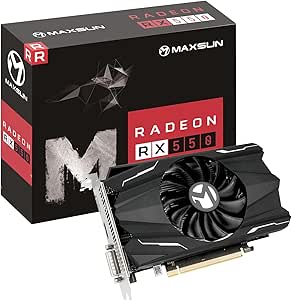
maxsun AMD Radeon RX 550 4GB GDDR5 ITX Computer PC Gaming Video Graphics Card GPU 128-Bit DirectX 12 PCI Express X16 3.0 DVI-D Dual Link, HDMI, DisplayPort
This maxsun AMD Radeon RX 550 stands out for its low power consumption and compatibility with Linux, making it a reliable choice for users prioritizing stability. Compared with the MOUGOL RX 580, it offers less raw power but excels in energy efficiency and small form factor design. The key tradeoff is its limited performance at higher resolutions or demanding workloads, which makes it less suitable for gaming beyond 1080p or intensive video editing. Its lower heat output and all-solid capacitors contribute to a more stable Linux experience, especially in compact builds. However, this card lacks support for newer features found in higher-end models, so expect some compromises in gaming performance and future-proofing. Suitable for Linux users who want a straightforward, stable GPU for everyday tasks and light gaming without overextending power or cooling needs.
Pros:- Excellent energy efficiency and low power draw
- Compact size ideal for small cases
- Solid build with all-solid capacitors for stability
- Good Linux driver support with stable performance
Cons:- Limited gaming performance at higher resolutions
- No support for advanced features like ray tracing
- Less suitable for demanding 3D rendering or video editing
Best for: Linux users seeking a budget-friendly, low-noise GPU for everyday use, light gaming, and multimedia tasks.
Not ideal for: Power users or gamers who need high-resolution gaming or GPU-intensive applications; this card isn’t designed for demanding workloads.
- GPU Clock Speed:1183 MHz
- Memory:4 GB GDDR5
- Memory Speed:6000 MHz
- Interface:PCI-Express x16 3.0
- Outputs:DVI-D, HDMI, DisplayPort
- Maximum Resolution:8K
- Stream Processors:512
- Warranty:3 Years
- Item Dimensions:7.28″L x 4.44″W
Bottom line: This card is perfect for Linux users who prioritize stability and efficiency over high-end gaming performance.
MOUGOL AMD Radeon RX 580 Gaming Graphics Card, 8GB GDDR5 256-Bit, Dual Fan Cooling, DP/HDMI/DVI Video Output, PCI Express X16 3.0, Computer GPU Support Windows 11/10/7 Desktop PC
This MOUGOL RX 580 makes a compelling choice for Linux gamers who want more power for 1080p gaming and content creation without breaking the bank. Its 8GB GDDR5 memory and 256-bit bus outperform the RX 550, offering smoother gameplay and better multitasking. The dual-fan cooling system ensures stable operation under load, which is important for Linux environments where driver support can be finicky. Compared with the maxsun RX 550, it provides a significant boost in gaming potential but consumes more power and generates more heat, requiring better cooling solutions. Its high maximum resolution and compatibility with AMD’s drivers make it suitable for users who want a balanced mix of gaming, streaming, and light editing on Linux. However, it’s not ideal for high-end 3D rendering or VR, given its mid-range positioning.
Pros:- Higher VRAM and bandwidth for smoother gaming
- Dual-fan cooling for better thermal management
- Good driver support with AMD Linux drivers
- Supports triple monitor setups
Cons:- Higher power consumption compared to entry-level cards
- Louder operation under load
- Not suitable for high-end VR or 4K gaming
Best for: Linux users who want a reliable, affordable GPU capable of handling modern games and multimedia editing at 1080p.
Not ideal for: Users aiming for 4K gaming or high-end VR; this card’s performance is optimized for 1080p and standard multimedia tasks.
- GPU Clock Speed:1206 MHz
- Memory:8 GB GDDR5
- Memory Speed:1500 MHz
- Interface:PCI-Express x16 3.0
- Outputs:DVI, HDMI, DisplayPort
- Maximum Resolution:7680×4320
- Stream Processors:2048
- Warranty:Not specified
- Item Dimensions:9.45″L x 5.31″W
Bottom line: This GPU offers a solid upgrade path for Linux gamers seeking balanced performance and affordability.
MOUGOL AMD Radeon R5 230 Low Profile Graphics Card with 2G 64Bit GDDR3 Memory Equip with PCI Express*16 2*HDMI Video Card for Office Working Compatible with Windows 10/8/7/RHEL/Ubuntu/Linux (Black)
This MOUGOL R5 230 is suitable for users who need basic graphics capabilities on Linux, such as office work or HD video playback. Its 2GB GDDR3 memory and low-profile design make it ideal for compact or SFF builds, but it offers limited performance for gaming or intensive editing. Compared with the maxsun RX 550, it has less modern features and lower memory bandwidth, which impacts performance in multimedia tasks. The card supports Linux well with basic driver support, but it’s not recommended for demanding workloads or gaming at higher resolutions. Its primary strength lies in stability and low power consumption, making it a good choice for simple, reliable Linux setups, especially in small form factor cases.
Pros:- Low profile and space-saving design
- Reliable Linux driver support
- Low power consumption and easy installation
- Good for multi-monitor setups
Cons:- Limited performance for gaming and editing
- Older GDDR3 technology, less efficient
- No support for modern features like DirectX 12
Best for: Linux users needing a stable, low-power GPU for office tasks, HD video, and light multimedia in small or space-constrained systems.
Not ideal for: Gaming, 3D rendering, or multimedia editing; this card is too limited for demanding applications.
- GPU Memory:2 GB GDDR3
- Memory Interface:64-bit
- Outputs:2x HDMI
- Maximum Resolution:1920×1080
- Interface:PCI-Express x16
- Item Dimensions:5.7″L x 2.7″W
Bottom line: This entry-level card is ideal for Linux users who prioritize stability and basic multimedia over gaming performance.
AMD Radeon Pro WX 3200 4GB GDDR5 Low Profile Graphic Card
This AMD Radeon Pro WX 3200 is tailored for Linux-based professional workstations, offering stability, certified drivers, and high-resolution support. Compared to gaming-oriented cards like the RX 580, it focuses on reliability and accuracy, making it ideal for CAD, 3D modeling, and content creation in Linux environments. Its 4GB GDDR5 memory ensures smooth handling of complex projects, but it lacks raw gaming power and ray tracing features. The card’s certified Linux drivers guarantee a stable experience, making it a dependable choice for professionals needing precision and stability over gaming performance. Its low profile and single fan design suit SFF workstation builds, but it isn’t suitable for gaming or VR workloads.
Pros:- Certified Linux driver support for stability
- High-resolution output up to 5120×2880
- Low profile design ideal for SFF workstations
- Good for CAD and 3D applications
Cons:- Limited gaming performance
- No support for advanced gaming features
- Higher cost compared to consumer gaming cards
Best for: Linux professionals working in CAD, 3D modeling, or video editing who need certified stability and high-resolution support.
Not ideal for: High-end gaming or VR development; this card prioritizes stability and accuracy over raw graphics power.
- GPU Memory:4 GB GDDR5
- Maximum Resolution:5120×2880
- Display Outputs:DisplayPort
- Interface:PCI-Express x16
- Form Factor:Low profile
- Warranty:90 days (renewed)
Bottom line: This GPU is a solid choice for Linux users needing reliable, professional-grade graphics for workstation tasks.
maxsun AMD R5 230 Computer Graphics Card, 2G GDDR3, HDMI VGA DVI Video Card ITX SFF Low Profile Ready GPU
This maxsun R5 230 offers basic graphics support suitable for Linux users focused on office work, HD videos, and light multitasking. Its 2GB GDDR3 memory and low-profile design favor small cases and low power setups. Compared with the AMD Radeon Pro WX 3200, it’s less suitable for professional work or high-resolution displays, but it provides reliable basic performance for everyday tasks. Its older GDDR3 technology means lower efficiency and performance in multimedia applications. Linux driver support is generally good for basic tasks, but don’t expect it to handle gaming or high-end content creation. It’s a budget-friendly, space-efficient option for minimal Linux desktop needs.
Pros:- Low profile and SFF compatibility
- Reliable Linux support for basic use
- Energy-efficient with low power needs
- Simple plug-and-play setup
Cons:- Limited performance for gaming or editing
- Older GDDR3 memory technology
- No support for modern features like DirectX 12
Best for: Linux users seeking a low-cost, stable GPU for office work, HD video playback, and light multitasking.
Not ideal for: Gaming, 3D rendering, or graphics-intensive applications; this card is too limited for demanding workloads.
- GPU Memory:2 GB GDDR3
- Outputs:HDMI, VGA, DVI
- Maximum Resolution:1920×1080
- Interface:PCI-Express x8
- Item Dimensions:5.7″L x 2.7″W
Bottom line: This low-cost, space-saving GPU is well-suited for Linux users with basic desktop needs and limited space.
Dell AMD Radeon R5 240 1GB DDR3 DVI/ D-Port Video Card F9P1R (Renewed)
The Dell AMD Radeon R5 240 stands out for its affordability and compatibility with older systems, making it a decent option for Linux users with legacy hardware. Compared to the maxsun AMD Radeon RX 550, which offers more modern features and better support for recent Linux kernels, the R5 240 is limited by its outdated GDDR3 memory and low performance. Its maximum resolution of 1920×1080 suits basic desktop tasks and light media use, but it struggles with demanding applications. The card’s single fan and heatsink make it quiet and simple to install, yet its age means it may lack full Linux driver support, especially for newer kernels or features. This choice is best for users who prioritize low cost and have minimal graphical needs, but it’s not ideal for gaming or GPU-accelerated workloads on Linux.
Pros:- Very affordable, suitable for budget builds
- Simple installation and low noise operation
- Compatible with older PCI Express slots
Cons:- Limited performance for modern applications
- Potential compatibility issues with recent Linux kernels
- Outdated GDDR3 memory may hinder driver support and stability
Best for: Linux users running very old desktops who need basic display output without high performance demands.
Not ideal for: Enthusiasts or gamers seeking modern GPU features or better Linux driver support for newer kernels.
- Memory Size:1 GB
- Memory Technology:GDDR3 SDRAM
- Interface:PCI Express
- GPU Clock Speed:2 GHz
- Video Output Interface:DVI, DisplayPort
- Maximum Resolution:1920×1080
Bottom line: This card suits Linux users with legacy systems needing basic display output on a tight budget, but not for demanding workloads.

How We Picked
To determine the best AMD graphics cards for Linux, I evaluated each product based on Linux driver support, compatibility, performance benchmarks, build quality, and value. Preference was given to cards with proven Linux support, especially those with open-source AMDGPU driver compatibility. I also considered the intended use case—whether for gaming, professional work, or basic tasks—and balanced this against price and form factor. The ranking highlights options that deliver reliable Linux operation while meeting different user needs, from casual users to professionals.Factors to Consider When Choosing Best AMD Graphics Cards For Linux Users
Choosing the right AMD graphics card for Linux involves more than just raw specifications. Compatibility with your Linux distribution, driver support, and intended workload greatly influence your choice. The following factors help clarify what to prioritize to ensure a smooth experience and long-term satisfaction.Linux Driver Support and Compatibility
Linux driver support is paramount. AMD’s open-source AMDGPU driver generally provides excellent support for newer cards, but some older models may rely on legacy drivers or proprietary components. Always verify that the GPU is well-supported on your specific Linux distribution and kernel version. Compatibility issues can lead to reduced performance or stability problems, so investing in cards with proven Linux support reduces frustration and setup time.
Performance Needs and Use Case
Define what you want to do with your GPU—gaming, professional workloads, or basic desktop use. High-end cards like the Radeon RX 580 deliver strong gaming and compute performance, suitable for most Linux-compatible games and applications. For professional workloads like CAD or 3D rendering, professional series cards such as the Radeon Pro WX 3200 are tailored for stability and driver support in workstation environments. Choosing a card aligned with your primary tasks ensures you don’t overspend or underperform.
Form Factor and Power Consumption
Consider your build’s size and power supply. Low-profile and SFF cards are necessary for small cases or compact builds but often come with performance tradeoffs. Power consumption also varies; entry-level cards consume less and generate less heat, making them ideal for energy-conscious or space-constrained setups. Matching the card’s size and power needs with your system prevents compatibility issues and unnecessary upgrades.
Price and Future-Proofing
Balance your budget against future needs. Investing a bit more in a recent, well-supported card can extend your system’s lifespan and provide better support for upcoming Linux kernel updates. Conversely, cheaper, older models might satisfy basic tasks but could lack ongoing driver updates or performance headroom. Be mindful of the long-term value rather than just initial cost.
Additional Features and Connectivity
Look for the specific outputs and features you need, such as HDMI, DisplayPort, or DVI. Support for multiple monitors and high resolutions can influence your choice. Also, consider VRAM size—more VRAM benefits gaming, 3D work, and high-resolution displays. Ensuring the GPU has all the connectivity options you require prevents the need for additional adapters or hardware changes later.
Frequently Asked Questions
Will all AMD cards work seamlessly with Linux?
Most recent AMD cards with the AMDGPU driver have excellent Linux support, especially from the RX 400 series onward. However, some older models or professional cards might have limited or less stable driver support. Always check the compatibility with your Linux kernel version and distribution before purchasing. Community forums and official driver documentation can help verify whether a specific model will work smoothly for your setup.
Is it better to buy a professional AMD GPU for Linux workstations?
Professional AMD GPUs like the Radeon Pro series are designed with stability and driver support in mind for workstation tasks. They often provide better Linux compatibility and more reliable performance for CAD, 3D modeling, or other demanding workflows. However, they tend to be more expensive than consumer-grade cards and may not be suitable for gaming. For professional use, the investment can pay off through increased stability and driver longevity.
Should I prioritize VRAM when choosing an AMD GPU for Linux?
VRAM size influences performance in high-resolution gaming, 3D rendering, and multi-monitor setups. For most Linux gaming and desktop use, 4GB to 8GB of VRAM strikes a good balance. However, if you plan to work with large datasets or high-res content, opting for a card with 8GB or more can improve performance and future-proofing. Be mindful that more VRAM usually increases cost, so match it to your actual needs.
Are low-profile AMD cards suitable for gaming on Linux?
Low-profile AMD cards like the Radeon R5 220 or R7 350 are generally limited in gaming performance. They are best suited for basic desktop tasks, media centers, or multimedia playback rather than gaming. If gaming is a priority, investing in a full-sized, mid-range or high-end card will provide much better performance and driver support for Linux. Low-profile options are more about space-saving than raw power.
How important is driver support for future Linux updates?
Driver support is essential for ensuring your GPU remains functional and performant after Linux kernel or distribution updates. AMD’s open-source AMDGPU driver has a strong track record of ongoing improvements, making recent cards a safer choice for longevity. Relying on legacy or proprietary drivers may lead to compatibility issues down the line. Choosing a well-supported card now reduces the risk of needing hardware replacements or complex workarounds in the future.
Conclusion
For most Linux users, the AMD Radeon RX 580 offers the best balance of performance, compatibility, and value, making it the ideal choice for gamers and general users. Those seeking professional stability and workstation support should consider the Radeon Pro WX 3200. Budget-conscious users or media centers might find the Radeon R5 220 or HD 5450 sufficient, though with significant performance limitations. Beginners should prioritize cards with proven Linux support and straightforward setup, while advanced users can aim for higher-end models that offer extra headroom for gaming or creative work. Ultimately, matching your specific needs with driver support and form factor considerations will guide you to the best AMD GPU for your Linux system in 2026.