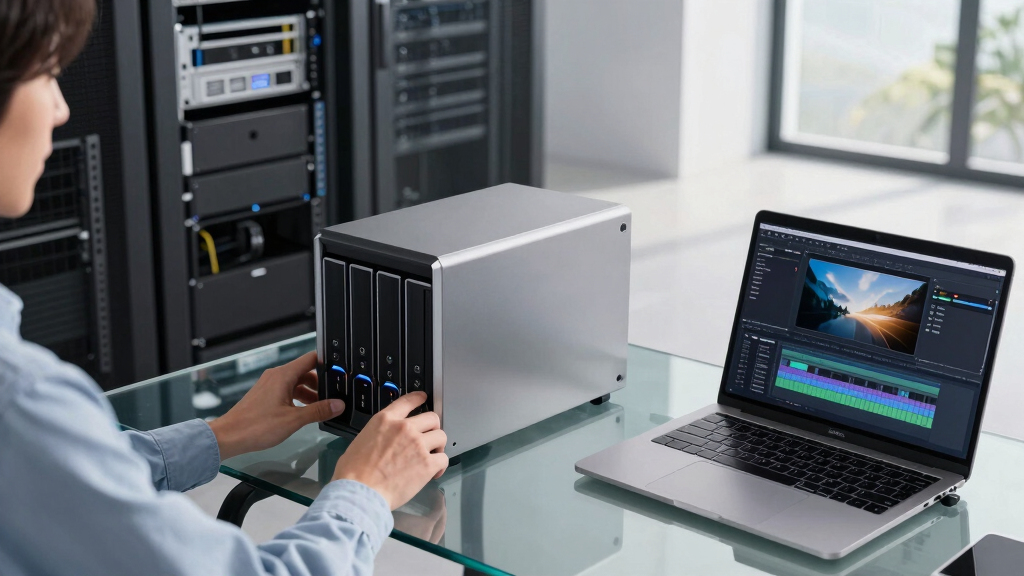

Searching for the best high capacity NAS for video archives? The ideal choice balances storage space, performance, and reliability—key factors for managing large video files. The Asustor Drivestor 4 Pro stands out as the best overall, offering solid performance at a reasonable price. For those prioritizing raw storage capacity, the WD 26TB My Book provides massive external storage, but with less flexibility for network access. Meanwhile, the Western Digital 14TB WD Red Pro strikes a good middle ground for professional use. Keep reading to see how these options compare and find the best fit for your video archiving needs.
Key Takeaways
- Storage capacity and scalability are critical for long-term video archiving, with larger drives like 14TB and 26TB making a significant difference.
- Performance factors such as network throughput and drive speed directly impact how efficiently large video files can be accessed or transferred.
- Build quality and durability, especially for NAS units and drives, influence long-term reliability in continuous operation environments.
- Price-to-value ratio varies; high capacity external drives are cheaper but less flexible than NAS systems with multiple bays and features.
- Ease of setup and maintenance are often overlooked but vital, especially for users without extensive technical experience.


More Details on Our Top Picks
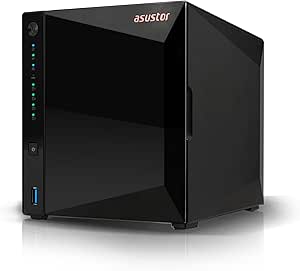
Asustor Drivestor 4 Pro Gen2 AS3304T v2, 4 Bay NAS, 1.7GHz Quad-Core, 2.5GbE Port, 2GB RAM DDR4, Best Value for Home Media Server, Network Attached Storage(Diskless)
This NAS stands out for delivering solid performance at an accessible price point, making it an excellent choice for home users looking to archive large video collections without breaking the bank. Compared to higher-end options like the Synology HAT3300, it offers a less powerful processor and only 2GB RAM, which may limit transcoding capabilities under heavy loads. However, its support for 4K videos and superfast 2.5GbE Ethernet ensures smooth streaming for most home setups. The upgrade from basic models like the WD My Book Duo is significant in terms of network connectivity and internal storage flexibility, but it does involve a tradeoff in raw processing power. If you prioritize affordability and ease of setup over maximum throughput, this model makes a compelling case. Its tool-free installation and snapshot features provide added convenience, but the 2GB RAM could hinder performance with multiple simultaneous streams or extensive transcoding tasks.
Pros:- Cost-effective solution with good performance for its price
- Supports 4K video transcoding
- Tool-free disk installation and snapshot support
Cons:- Limited RAM may restrict multitasking and transcoding
- Processor performance might lag with multiple streams
- No included drives, so total capacity depends on disks purchased separately
Best for: Home users who want a budget-friendly NAS capable of storing and streaming large video files with minimal fuss.
Not ideal for: Power users or small businesses needing intensive multitasking or real-time 4K transcoding, as the 2GB RAM may become a bottleneck.
- Processor:1.7GHz Quad-Core
- RAM:2GB DDR4
- Ethernet:2.5GbE Port
- Bay Count:4
- Drive Type:Diskless
- Video Support:4K transcoding
- Installation:Tool-free
- Snapshot Support:Yes
Bottom line: This NAS is ideal for home users prioritizing value over raw processing power for video storage and streaming.
Western Digital 6TB WD Red Plus NAS Internal Hard Drive HDD – 5400 RPM, SATA 6 Gb/s, CMR, 256 MB Cache, 3.5″ -WD60EFPX
This drive excels in quiet operation and reliable daily use, making it well-suited for small NAS environments where stability is key. Compared to the WD Red Pro series like the WD142KFGX, it offers a lower rotational speed of 5400 RPM, trading some performance for reduced noise and heat. This makes it less ideal for high-traffic video archives that demand fast data transfer, yet it remains a solid choice for steady, long-term storage. Its support for CMR technology ensures consistent write speeds, outperforming SMR drives prone to slower, inconsistent writes. For users considering the Synology HAT3300, this drive’s capacity and speed are more modest, but it’s easier on power consumption and noise levels. If your primary goal is a dependable drive for archival storage in a home or small office NAS, this model offers a good balance of reliability and silence, though at the expense of maximum throughput.
Pros:- Quiet operation with minimal heat output
- Supports CMR for consistent write performance
- Good durability with a 3-year warranty
Cons:- Lower rotational speed limits transfer speeds
- Not suitable for high-traffic video streaming or editing
- Capacity might be insufficient for very large, active archives
Best for: Small business or home users needing a dependable, quiet drive for storing large video files with moderate access demands.
Not ideal for: High-demand environments requiring rapid data access or intensive transcoding, as the 5400 RPM speed limits transfer rates.
- Capacity:6TB
- RPM:5400
- Cache:256MB
- Interface:SATA 6 Gb/s
- Technology:CMR
- Form Factor:3.5″
- Workload Rate:180 TB/year
- Warranty:3 years
Bottom line: This drive is best suited for reliable, low-noise storage in small NAS setups where maximum speed is not critical.
Western Digital 14TB WD Red Pro NAS Internal Hard Drive HDD – 7200 RPM, SATA 6 Gb/s, CMR, 512 MB Cache, 3.5″ -WD142KFGX
Compared to the WD Red Plus, the WD Red Pro series like the WD142KFGX offer higher rotational speeds and larger caches, making them more suitable for intensive video archival tasks in medium to large NAS environments. This drive’s 7200 RPM speed delivers noticeably faster data transfer, which is vital when managing large video files in multi-user setups. Its support for workloads up to 550TB/year and high durability makes it a strong choice for businesses needing reliable, continuous operation. While the Synology HAT3300 provides a dedicated NAS solution, this drive’s compatibility with most NAS brands and its robust performance make it a versatile option for expanding existing systems. The main tradeoff involves higher power consumption and heat generation, which could be a concern in densely packed NAS units. If your priority is high throughput for video archives in a multi-user environment, this drive justifies the investment.
Pros:- 7200 RPM speed for faster data transfer
- Supports high workloads up to 550TB/year
- Enhanced durability with 5-year warranty
Cons:- Higher power consumption and heat output
- Bulkier and possibly noisier than lower RPM drives
- Price premium compared to smaller capacity drives
Best for: Medium-sized businesses or advanced home NAS users handling large video libraries with high access demands.
Not ideal for: Small home setups or users with limited power or cooling capacity, since the drive generates more heat and consumes more power.
- Capacity:14TB
- RPM:7200
- Cache:512MB
- Interface:SATA 6 Gb/s
- Technology:CMR
- Form Factor:3.5″
- Workload Rate:550 TB/year
- Warranty:5 years
Bottom line: This drive is best for demanding NAS environments where speed and durability outweigh power and thermal considerations.
WD 16TB My Book Duo Desktop RAID External Hard Drive HDD, USB 3.1, With Password Protection and Auto Backup Software – WDBFBE0160JBK-NESN
This external drive offers a straightforward solution for video archiving, especially for users who prefer plug-and-play access with RAID-0 for maximum speed. Its 16TB capacity and USB 3.1 interface ensure fast data transfer, comparable to internal drives like the WD Red Pro, but with the added convenience of external setup. The RAID-0 configuration provides improved read/write speeds, ideal for large video files, but at the risk of data loss if one disk fails—so it requires backups. Its password protection and auto-backup features add security and data integrity benefits. While it lacks the expandability of a NAS, it’s perfect for users who want quick access to large video collections without the need for network setup or ongoing maintenance. The main compromise is that it’s external, so it’s less suitable for multi-user environments or continuous 24/7 operation compared to NAS drives like the Synology HAT3300.
Pros:- High capacity with RAID-0 for speed
- USB 3.1 interface for fast data transfer
- Password protection and backup software included
Cons:- RAID-0 increases risk of data loss if one disk fails
- Less suitable for multi-user or 24/7 NAS deployment
- External enclosure may be less durable over long-term heavy use
Best for: Content creators or enthusiasts needing portable, high-capacity storage for video projects with flexible RAID options.
Not ideal for: Small business or multi-user NAS environments where continuous, multi-user access and reliability are critical.
- Capacity:16TB
- Connection:USB 3.1
- RAID:RAID-0
- Speed:Up to 360MB/s
- Form Factor:External Desktop
- Encryption:Password protection
- Backup Software:Included
- Warranty:3 years
Bottom line: This external RAID drive is ideal for fast, portable storage of large video files, but less suited for constant multi-user NAS tasks.
Synology HAT3300 6TB Plus Series SATA HDD 3.5″ (HAT3300-6T)
Designed specifically for Synology NAS systems, the HAT3300 offers exceptional reliability and endurance, backed by a 3-year warranty and rigorous validation. Its 7200 RPM speed outperforms many standard drives like the WD Red Plus, providing faster data access essential for video storage and retrieval in multi-user environments. The drive’s validated compatibility with Synology systems ensures seamless integration and firmware updates, making it a top choice for dedicated NAS setups. Compared to the WD Red Pro, the HAT3300’s optimized firmware and high MTBF (mean time between failures) support long-term, 24/7 operation. However, it’s less flexible in terms of cross-brand compatibility and may be more expensive per terabyte. For users with Synology systems seeking a reliable, high-performance video archive drive, this model offers excellent value with minimal compromises.
Pros:- Optimized for Synology NAS systems
- 7200 RPM for faster data access
- Proven reliability with extensive testing
Cons:- Limited compatibility outside Synology
- Higher cost per TB compared to other drives
- Capacity limited to 6TB in this model
Best for: Synology NAS owners requiring a durable, high-speed drive for video archiving in multi-user environments.
Not ideal for: Non-Synology systems or users looking for a more versatile or larger capacity drive without Synology-specific features.
- Capacity:6TB
- RPM:7200
- Technology:CMR
- Warranty:3 years
- Form Factor:3.5″
- MTBF:1 million hours
- Workload Rate:180 TB/year
- Compatibility:Synology NAS
Bottom line: This drive is best for Synology NAS users prioritizing reliability and performance for large video archives.
Synology HAT3300 6TB Plus Series SATA HDD 3.5″ (HAT3300-6T)
Designed specifically for Synology NAS systems, the HAT3300 offers exceptional reliability and endurance, backed by a 3-year warranty and rigorous validation. Its 7200 RPM speed outperforms many standard drives like the WD Red Plus, providing faster data access essential for video storage and retrieval in multi-user environments. The drive’s validated compatibility with Synology systems ensures seamless integration and firmware updates, making it a top choice for dedicated NAS setups. Compared to the WD Red Pro, the HAT3300’s optimized firmware and high MTBF (mean time between failures) support long-term, 24/7 operation. However, it’s less flexible in terms of cross-brand compatibility and may be more expensive per terabyte. For users with Synology systems seeking a reliable, high-performance video archive drive, this model offers excellent value with minimal compromises.
Pros:- Optimized for Synology NAS systems
- 7200 RPM for faster data access
- Proven reliability with extensive testing
Cons:- Limited compatibility outside Synology
- Higher cost per TB compared to other drives
- Capacity limited to 6TB in this model
Best for: Synology NAS owners requiring a durable, high-speed drive for video archiving in multi-user environments.
Not ideal for: Non-Synology systems or users looking for a more versatile or larger capacity drive without Synology-specific features.
- Capacity:6TB
- RPM:7200
- Technology:CMR
- Warranty:3 years
- Form Factor:3.5″
- MTBF:1 million hours
- Workload Rate:180 TB/year
- Compatibility:Synology NAS
Bottom line: This drive is best for Synology NAS users prioritizing reliability and performance for large video archives.
WD 26TB My Book Desktop External Hard Drive, USB 3.0, External HDD with Password Protection and Auto Backup Software – WDBBGB0260HBK-NESN
This external hard drive from Western Digital offers an enormous 26TB of storage, making it a strong choice for those who need to archive large video libraries outside of a NAS environment. Compared to NAS options like the Asustor Drivestor 4 Pro, this drive provides straightforward, plug-and-play setup without network complexity, but it lacks the scalability and multi-user access of a true NAS. Its key advantage is capacity—ideal for individuals or small teams storing high volumes of footage—yet it sacrifices features like RAID redundancy and remote access. The included backup software and hardware encryption add layers of security and convenience, but in a professional or multi-user setting, it can’t match the collaborative features of a dedicated NAS system. The drive’s reliance on USB 3.0 also limits transfer speeds compared to newer interfaces present in other options. For users who primarily need a large, reliable external archive without network features, this is a compelling choice.
Pros:- Massive 26TB storage capacity suitable for extensive video archives
- Plug-and-play setup for immediate use without network configuration
- Hardware encryption and password protection for data security
- Includes backup software to simplify data management
Cons:- Lacks network connectivity; cannot serve as a shared NAS
- Limited to USB 3.0, which may bottleneck transfer speeds on newer systems
- No redundancy or RAID options, risking data loss if drive fails
Best for: Video editors or hobbyists needing a high-capacity, portable archive for off-site storage with simple backup needs.
Not ideal for: Teams requiring multi-user access, network sharing, or RAID redundancy—this is purely an external drive, not a network solution.
- Capacity:26TB
- Interface:USB 3.0
- Encryption:Hardware encryption
- Backup Software:Included
- Compatibility:Windows and Mac
- Dimensions:Approx. 6.7 x 5.5 x 1.9 inches
- Weight:Approximately 3.1 pounds
- Power:AC-powered
- Security:Password protection
Bottom line: This drive makes the most sense for individuals or small teams prioritizing raw capacity and simple, secure storage over network features.
How We Picked
The products in this roundup were selected based on their storage capacity, performance potential, build quality, and compatibility with video archiving workflows. Priority was given to NAS devices that support multiple drives, fast data transfer, and reliable operation over time. Cost-effectiveness was also considered, balancing affordability with features needed for large-scale video storage. The ranking reflects a combination of these factors, aiming to highlight options suitable for both professional and enthusiast users managing heavy video archives.Factors to Consider When Choosing Best High Capacity NAS For Video Archives
Choosing the best high capacity NAS for video archives involves assessing several key factors. Beyond raw storage, it’s important to consider performance, ease of use, and expandability. This guide explores critical considerations to help you make an informed decision and avoid common pitfalls that can limit your system’s effectiveness over time.Storage Capacity and Scalability
For video archives, storage capacity is the foundation. Larger drives and multiple bays allow for future growth, reducing the need for frequent upgrades. Consider your current needs and future expansion plans—some NAS units support drive stacking or additional expansion ports. Opting for drives with higher capacities like 14TB or 16TB can save space and money over time, but ensure your NAS supports these sizes. Beware of choosing a NAS with limited bays if you anticipate your archive growing significantly, as this can lead to costly upgrades later.
Performance and Data Transfer Rates
High data transfer rates are essential for seamless video editing, playback, or batch transfers. Look for NAS models with gigabit or multi-gigabit Ethernet ports and support for SSD caching if speed is critical. The drives inside also matter; faster rotational speeds (7200 RPM vs. 5400 RPM) and CMR technology improve reliability and throughput. Remember, a bottleneck at the network or drive level can slow down your entire workflow, so prioritize balanced performance specs.
Build Quality and Reliability
Since video archives often require 24/7 operation, durability and reliability are non-negotiable. NAS enclosures should have solid construction with proper cooling solutions to prevent overheating. Hard drives designed for NAS use, like WD Red or Seagate IronWolf, are optimized for continuous operation. Investing in reputable brands reduces the risk of drive failure, which can be catastrophic for long-term storage. Avoid cheap or poorly ventilated enclosures that might overheat or fail prematurely.
Ease of Management and Usability
A complicated setup can slow down your workflow, especially if you lack technical expertise. Look for NAS devices with intuitive interfaces, straightforward setup processes, and good software support. Features like automated backups, RAID configurations, and remote access add significant value. Remember that maintenance tasks, like drive replacement or firmware updates, should be simple to perform. Overly complex systems may cause frustration and downtime, defeating the purpose of a reliable archive solution.
Cost and Total Value
Price varies widely depending on capacity, features, and brand. External drives like the WD 26TB are less expensive upfront but lack the flexibility of NAS systems. Investing more in a multi-bay NAS can offer better long-term value through scalability, faster performance, and enhanced features. Beware of overly cheap options that might compromise durability or performance. Assess your budget against your storage needs and workflow requirements to find a balanced choice that minimizes future upgrades or replacements.
Frequently Asked Questions
Is a NAS necessary for video archiving, or can I rely solely on external drives?
While external drives can handle large storage needs, a NAS offers many advantages for video archiving, such as centralized access, RAID redundancy for data protection, and better scalability. If you need multiple users or remote access, a NAS becomes a more practical solution. Relying solely on external drives limits flexibility and can increase the risk of data loss if drives fail. For long-term, reliable video storage, a NAS provides a more robust and manageable environment.
How important is drive speed when choosing hard drives for a NAS used for video archives?
Drive speed directly impacts how quickly large video files can be read or written. 7200 RPM drives generally offer faster data transfer rates than 5400 RPM models, reducing wait times during editing or backups. For archival purposes, speed may be less critical than capacity and reliability, but a faster drive can significantly improve your workflow if you’re frequently accessing or transferring large files. Always choose drives designed for NAS environments to ensure long-term stability and performance.
Can I upgrade or expand my NAS storage later if I run out of space?
Most modern NAS systems support expansion via additional drive bays or external expansion units, but this varies by model. When selecting a NAS, check its scalability options—some support hot-swappable drives or link multiple units. Planning ahead for future growth can save money and effort later. Keep in mind that increasing storage may require reconfiguring RAID arrays or reinstalling drives, so understanding your NAS’s expansion capabilities before purchase is wise.
What features should I prioritize in a NAS if I want to use it for professional video editing?
For professional video editing, prioritize high data transfer speeds, support for SSD caching, and multiple Gigabit or Multi-Gigabit Ethernet ports. Redundancy features like RAID help protect your data, while user-friendly management interfaces enable easier maintenance. Compatibility with editing software and remote access capabilities can streamline your workflow. Investing in a well-designed, reliable NAS with fast networking options ensures your editing process remains smooth and efficient.
Are external drives a good alternative to NAS for long-term video storage?
External drives are suitable for short-term or portable storage needs but are less ideal for long-term video archives due to limitations in scalability, data redundancy, and convenience for multiple users. They are more vulnerable to physical damage or failure, and managing multiple drives can become cumbersome. For reliable, scalable, and accessible long-term storage, a dedicated NAS provides better protection, easier management, and room to grow as your archive expands.