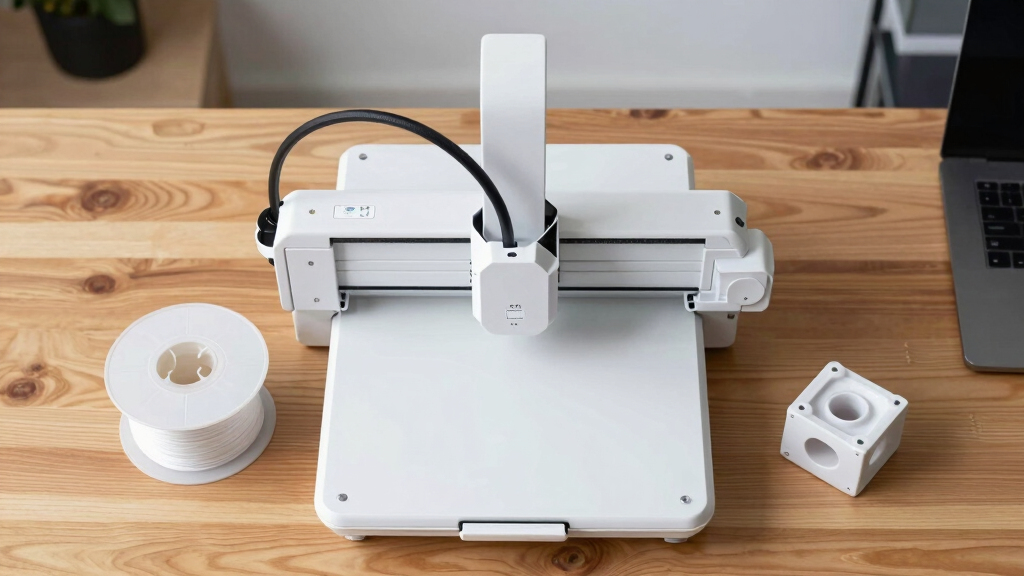
Starting with 3D printing can be exciting but also overwhelming due to the variety of options available. The best 3D printers for beginners strike a balance between ease of use, reliability, and affordability. The FLASHFORGE Adventurer 5M stands out as the overall top pick for its user-friendly features and quick setup. The AOSEED 3D Printer for Kids offers excellent value for home and educational use, while the Bambu Lab P1S caters to those wanting faster, multi-material printing. Keep reading to see how these models compare and which one fits your needs best.
Listen free for 30 days with Audible
Thousands of audiobooks and originals — cancel anytime.
Start your free trialAs an affiliate, we earn on qualifying purchases.
Key Takeaways
- Speed and ease of setup are major factors influencing beginner satisfaction, with models like the Adventurer 5M excelling in quick deployment.
- Auto-leveling features significantly reduce the learning curve, making printers like the AD5M more accessible for new users.
- Price remains a key consideration; the AOSEED offers excellent value, but higher-end models like the Bambu Lab P1S deliver faster performance and more features for dedicated hobbyists.
- Material support and multi-color options vary widely, with premium options providing more versatility at a higher cost.
- Build volume tends to be smaller on beginner-focused models, but some options still offer enough space for most beginner projects.



More Details on Our Top Picks
FLASHFORGE Adventurer 5M Pro 3D Printer with 1 Click Auto Printing System, 600mm/s High-Speed, Quick Detachable 280°C Nozzle, Core XY All-Metal Structure, Multi-Functional 220x220x220mm 3D Printer
This model stands out for its combination of high speed and ease of use, making it ideal for those who want quick, reliable results without extensive tweaking. Compared to the Bambu Lab P1S, it offers similar speed but with a more straightforward setup process. Its all-metal Core XY structure guarantees stability at speeds up to 600mm/s, ensuring accuracy even during rapid printing. The automatic bed leveling and intuitive LCD interface make it highly accessible for beginners who might otherwise be intimidated by more complex features. However, this speed comes with increased noise levels, especially from the hotend fans and motors, which may be disruptive in quiet environments. Its versatile material support—PLA, ABS, PETG, and more—is a plus for creative flexibility, but the all-metal extruder reaching 280°C demands careful maintenance. Overall, this printer makes the most sense for users who prioritize speed and reliability over quiet operation or extensive customization.
Pros:- Blazing fast printing speeds of up to 600mm/s
- Automatic bed leveling with pressure sensing for hassle-free setup
- Supports a wide range of filament materials including high-temp options
Cons:- Significant noise from fans and motors at high speeds
- All-metal hotend requires diligent maintenance to prevent clogging
- Larger footprint and heavier weight at 32.1 pounds
Best for: Beginners who need a fast, dependable printer for prototypes and small projects with minimal calibration fuss
Not ideal for: Quiet home environments or users seeking a silent, highly customizable machine for detailed, multi-material work
- Print Volume:220x220x220mm
- Max Speed:600mm/s
- Nozzle Temperature:280°C
- Structure:Core XY all-metal
- Auto Leveling:Yes
- Material Support:PLA, ABS, PETG, ASA, TPU, PC
Bottom line: This pick suits those who value speed and simplicity, especially for rapid prototyping and functional parts.
FLASHFORGE AD5M 3D Printer Fully Auto Calibration Print with 1-Click Max 600mm/s Speed, All-Metal CoreXY Structure Precise Printing, Easy-Maintenance Quick-Swap Nozzle, Print Size 220x220x220mm
This model makes a strong case for users who want a true plug-and-play experience with minimal calibration effort, matching features from the FLASHFORGE Adventurer 5M but with enhanced control options. Unlike the 5M Pro, its fully automatic calibration system ensures consistent first layers, reducing setup time for beginners. It supports multiple nozzle sizes (0.25-0.8mm) and boasts a high-speed travel of 600mm/s, suitable for both rapid prototyping and detailed work. The remote control via Flash Maker app allows for monitoring and adjustments from anywhere, a feature absent in some other beginner models. Its hotend reaches 280°C and the double-sided PEI steel plate simplifies model removal, but its higher complexity may be overwhelming for absolute beginners. The all-metal construction promises durability, but its weight (22 pounds) and higher price point might be drawbacks for portable use. Overall, this printer is an excellent choice for those seeking automation and flexibility without sacrificing speed.
Pros:- Fully automatic bed calibration saves time and effort
- Multi-nozzle support for high-precision and high-efficiency printing
- Remote management and monitoring through mobile app
Cons:- Slightly more complex initial setup compared to simpler models
- Heavier weight at 22 pounds, less portable
- Higher price point relative to entry-level printers
Best for: Intermediate users or beginners who want minimal calibration and remote operation for versatile projects
Not ideal for: Total newcomers who prefer simple, manual setups or are on a tight budget
- Print Volume:220x220x220mm
- Max Speed:600mm/s
- Nozzle Temperatures:280°C
- Calibration:Fully automatic
- Material Support:PLA, ABS, PETG, ASA, TPU
- Connectivity:Wi-Fi via app
Bottom line: Ideal for users who want a reliable, automated printer with advanced features for a broad range of projects.
FLASHFORGE Adventurer 5M 3D Printer with Fully Auto Leveling, Max 600mm/s High Speed Printing, 280°C Direct Extruder with 3S Detachable Nozzle, CoreXY All Metal Structure, Print Size 220x220x220mm
This pick excels in delivering ultra-fast prints at speeds up to 600mm/s, making it perfect for users who need quick turnarounds, such as designers or educators. Compared to the Bambu Lab P1S, it emphasizes speed with extensive automatic leveling and a 280°C direct extruder for high-temp materials. Its Core XY all-metal frame ensures high stability at these speeds, while the detachable nozzle simplifies maintenance. The real-time remote monitoring via the Flash Maker app adds convenience, especially for classrooms or workshops. However, its noise levels can be significant due to high-speed motors and fans, and the rapid travel might compromise some layer adhesion if not carefully managed. The 220x220x220mm build volume is standard, but the focus on speed can lead to tradeoffs in detailed resolution. Overall, this printer suits those prioritizing speed and throughput over ultra-fine detail.
Pros:- Incredible printing speeds up to 600mm/s
- Automatic bed leveling with pressure sensing
- Quick-swap 3S nozzle for fast maintenance
Cons:- High noise output from motors and fans
- Layer adhesion may be affected at maximum speeds
- Moderate build volume limits larger projects
Best for: Prototyping professionals, educators, or rapid production environments needing swift results
Not ideal for: Users who require ultra-fine detail or operate in noise-sensitive environments
- Print Volume:220x220x220mm
- Max Speed:600mm/s
- Hotend Temperature:280°C
- Extruder Type:Direct drive
- Build Structure:Core XY all-metal
- Material Compatibility:High-temp materials including ABS and PETG
Bottom line: This printer is best for users who need high-speed production and can accept some tradeoffs in noise and resolution.
AOSEED 3D Printer for Kids, AI-Powered Fully Assembled 3D Printer with Up to 400mm/s Speed, Auto Leveling, 1500+ Models & 17+ Modules, Includes 8 PLA Filaments for Home and School Use, X-MAKER JOY AI+
This model is tailored for young learners and families, combining AI-powered model creation with a fully enclosed, safe design. Unlike traditional beginner printers, it introduces children to 3D printing through voice, text, and image prompts via the integrated AI assistant, making complex design accessible. Its auto-leveling platform and simple one-tap operation allow for quick setup, ideal for classrooms or home use. The included 8 filaments and 1500+ digital models provide endless creative options, and the built-in camera enables real-time monitoring, fostering engagement and sharing. While its speed up to 400mm/s is impressive, the focus on safety and ease of use means it sacrifices some fine detail and advanced customization. The fully enclosed design and low noise make it suitable for kids’ environments, but it is less suited for intricate professional projects. Overall, this is a perfect entry-level machine for fostering creativity in children and beginners.
Pros:- AI-powered model creation via voice, text, or images
- Fully enclosed, safe design with auto-leveling platform
- Includes extensive digital library and DIY modules
Cons:- Limited resolution compared to more advanced machines
- Maximum speed of 400mm/s is slower than high-end models
- Not suitable for detailed or multi-material professional projects
Best for: Parents, teachers, and beginners looking for a safe, engaging, and easy-to-use 3D printer for kids and educational activities
Not ideal for: Advanced hobbyists or professionals needing high precision and multi-material capabilities
- Print Volume:150x150x150mm
- Max Speed:400mm/s
- Filament Type:PLA
- Connectivity:Wi-Fi, App control
- Features:Auto-leveling, AI Model Creation, Built-in camera
- Ease of Use:One-tap operation
Bottom line: This printer is a fantastic choice for families and educators eager to inspire kids with safe, fun, and accessible 3D printing experiences.
Bambu Lab P1S 3D Printer, Fully Enclosed, Support Up to 16 Colors/Multi Materials, 500mm/s Fast Printing & High Precision, CoreXY & Auto Bed Leveling, Ready-to-Use FDM 3D Printers Large Print Size
This model stands out for its impressive combination of high-speed printing, multi-material support, and easy setup, making it ideal for beginners ready to advance their skills. Compared with the FLASHFORGE AD5X, the P1S offers support for up to 16 colors or materials, which allows more complex and vibrant projects, but it comes with a steeper initial learning curve and higher price tag. Its fully enclosed design improves print quality, especially with more sensitive filaments, while automatic bed leveling simplifies setup. The tradeoff is that its larger size and weight make it less portable, and its complexity might overwhelm absolute newcomers without prior experience. This pick makes the most sense for beginners who want to grow into more ambitious projects without sacrificing print quality or speed.
Pros:- Supports up to 16 colors/multi-material printing, enabling complex, vibrant designs
- Lightning-fast printing speeds of up to 500mm/s for efficient production
- Fully enclosed body improves print quality and filament compatibility
Cons:- Higher price point may be a barrier for some beginners
- Bulkier size reduces portability and requires more dedicated space
Best for: Beginners who want a versatile, fast, and high-quality machine capable of multi-material and multi-color printing as they develop their skills.
Not ideal for: Absolute beginners with limited space or budget, or those preferring a smaller, simpler machine for occasional use.
- Build Volume:200 x 220 x 250 mm
- Print Speed:Up to 500 mm/s
- Supported Filaments:PLA, PETG, TPU, PVA, PET ABS, ASA, PA, PC
- Auto Bed Leveling:Yes
- Enclosure:Fully enclosed
- Material Support:Multi-material, up to 16 colors
Bottom line: Best suited for beginners who want a powerful, multi-material capable printer that will support their growing skills and project complexity.
FLASHFORGE AD5X Multi-Color 3D Printer, CoreXY 600mm/s High-Speed, 1-Click Auto Leveling, 300°C Direct Drive Extruder, 220x220x220mm Build Volume, Ideal for Precision and Efficiency
This printer makes a compelling choice for beginners who prioritize speed, ease of use, and multi-color capabilities, similar to the Bambu Lab P1S but with a focus on rapid prototyping. Its 600mm/s speed and 1-click auto leveling reduce setup and print times, making it easier for beginners to achieve consistent results without technical hurdles. The built-in resume function and remote monitoring add to user convenience. However, its maximum support for 4 colors might limit complex multi-material projects compared with the P1S, and the smaller build volume is less suitable for larger models. The direct drive extruder and high-speed capabilities make it especially appealing for users who want quick, high-quality prints and are ready to experiment with multi-color effects. This is ideal for those seeking a balance of speed, ease, and creative output.
Pros:- Supports up to 4 colors simultaneously for vibrant multi-color printing
- 600mm/s high-speed printing enables rapid prototyping and batch production
- One-click auto leveling simplifies setup and reduces errors
Cons:- Limited support for multi-materials compared with the Bambu P1S
- Smaller build volume may restrict larger project printing
Best for: Beginners eager to master high-speed, multi-color printing with a focus on quick results and straightforward operation.
Not ideal for: Beginners who want support for many different materials or larger build volumes for bigger projects.
- Build Volume:220 x 220 x 220 mm
- Print Speed:Up to 600 mm/s
- Supported Filaments:PLA, ABS, TPU, PETG
- Auto Bed Leveling:Yes, 1-Click
- Extruder Temperature:300°C
- Material Support:Up to 4 colors
Bottom line: Best suited for beginners who want fast, colorful prints with minimal setup hassle and are okay with size limitations.
How We Picked
I evaluated these 3D printers based on a combination of factors that matter most to beginners. Performance aspects like print quality, speed, and ease of calibration were prioritized, as they directly impact the learning curve. Usability features such as auto-leveling, noise levels, and maintenance requirements played a role, since simpler operation encourages continued use. Value for money was also key, balancing upfront cost with longevity and versatility. Ultimately, the ranking reflects a mix of affordability, user-friendliness, and feature sets that best support someone new to 3D printing.Factors to Consider When Choosing Best 3D Printers For Beginners
When choosing a 3D printer as a beginner, several key factors can make or break your experience. Understanding these can help you avoid common pitfalls and select a model that truly fits your needs. From ease of use to material support, each aspect influences how smoothly your initial projects turn out and how motivated you’ll stay to learn and experiment.Ease of Use and Setup
Beginners benefit most from printers that require minimal assembly and offer straightforward calibration. Features like auto-leveling and touch-screen controls reduce setup frustrations and save time. Avoid models with complicated interfaces or manual bed leveling if you’re looking for a hassle-free introduction to 3D printing.
Print Quality and Speed
While high resolution is desirable, it often comes at the expense of speed and ease of use for beginners. Look for printers that strike a good balance—fast enough to keep you engaged, but with enough detail to produce satisfying results. Higher speeds can sometimes compromise quality, so consider your priorities carefully.
Material Compatibility
Most beginner printers support PLA, which is safe and easy to work with. However, if you want to explore other materials like ABS or TPU later, check for models that support a wider range of filaments. This flexibility can extend your projects and learning opportunities without needing an upgrade.
Build Volume
Smaller build volumes are common in beginner models, but they limit the size of your prints. Consider what projects you plan to create most often and choose a printer with a suitable size. A slightly larger volume can be more versatile without adding significant complexity.
Cost and Long-Term Value
While budget is always a concern, investing a bit more upfront can lead to a better experience with fewer frustrations and more reliable results. Cheaper models may require more maintenance or have lower print quality, so weigh initial savings against potential long-term benefits.
Frequently Asked Questions
Is auto-leveling necessary for a beginner 3D printer?
Auto-leveling significantly reduces setup time and helps ensure consistent print quality. For beginners, it minimizes the chance of failed prints caused by improper bed leveling, making the printing process more forgiving. While manual leveling isn’t difficult, auto-leveling features can help new users focus on learning and creating rather than troubleshooting.
Can I print with materials other than PLA on a beginner 3D printer?
Many entry-level printers primarily support PLA, which is the safest and easiest filament for beginners. However, some models support other materials like ABS or PETG, expanding your options as you gain experience. Always check the printer’s specifications and recommended filament types to avoid damage or poor results.
How important is print speed for a beginner?
Speed influences how quickly you see results and stay motivated. While faster printers can produce parts more quickly, extremely high speeds might sacrifice print quality or reliability. For beginners, a balanced speed that prioritizes good quality and ease of use tends to produce better learning experiences.
Do I need a large build volume as a beginner?
Most beginners find smaller build volumes sufficient for their initial projects, which are typically small and simple. Larger volumes can be advantageous if you plan to create bigger models, but they often come with increased complexity and cost. Starting with a modest size helps focus on mastering the basics before upgrading.
Is it worth investing in a more expensive 3D printer as a beginner?
Higher-priced models usually offer better reliability, faster speeds, and more features like multi-material support or auto-leveling. While they cost more upfront, they can reduce frustration and improve the quality of your prints. If your budget allows, investing a bit more can make your transition into 3D printing smoother and more enjoyable.
Conclusion
For those new to 3D printing, the FLASHFORGE Adventurer 5M offers the best overall experience thanks to its user-friendly features and reliable performance. Budget-conscious beginners will appreciate the AOSEED 3D Printer for Kids for its affordability and educational value. If you’re willing to invest in speed and multi-material support, the Bambu Lab P1S stands out as a premium choice. Ultimately, your best pick depends on your specific goals—whether that’s ease of use, advanced features, or budget-friendly entry into the hobby.Fall Picks
fall essentials
As an affiliate, we earn on qualifying purchases.