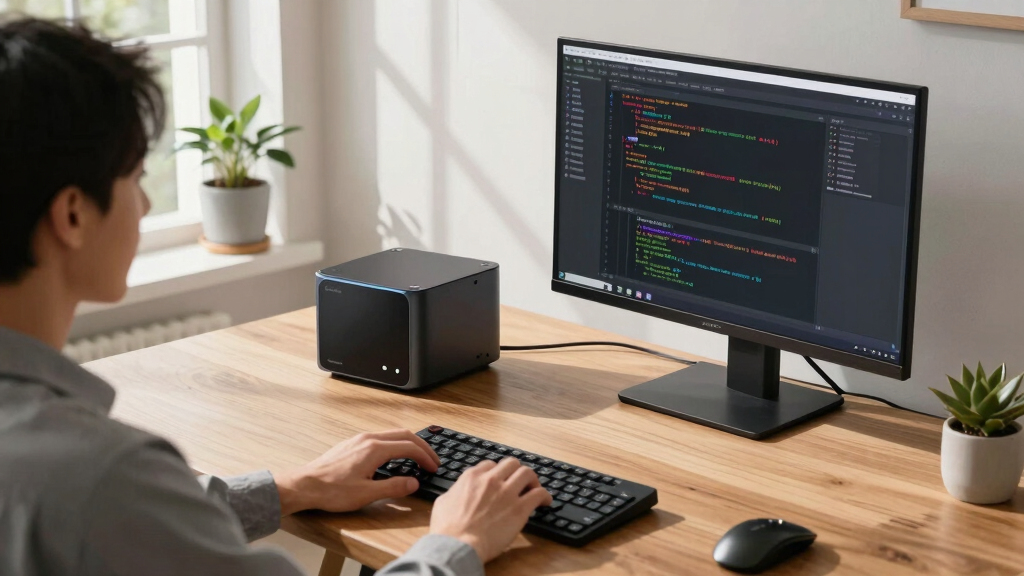

Choosing the ideal AI mini PC for local models in 2026 hinges on your specific needs: whether it’s raw processing power, multi-display capabilities, or a balance of value and performance. Top contenders like the MS-S1 MAX from Minisforum stand out for their astonishing power and expandability, making it a true workstation in a tiny form factor. Meanwhile, the GMKtec EVO-X2 offers a blend of high-end AI performance and impressive connectivity, perfect for demanding AI workloads and multimedia tasks. The Yahboom Jetson Orin NX caters to embedded and edge AI applications with a focus on low power and integration, while the MINISFORUM MS-S1 MAX redefines mini PC performance with a desktop-class architecture. Each choice involves tradeoffs: size versus power, cost versus expandability, and beginner-friendly features versus advanced customization. This guide compares these options through their core strengths, ideal users, shortcomings, and key specs to help you make an informed decision.
Key Takeaways
- The Minisforum MS-S1 MAX delivers unmatched power and expandability, suitable for AI professionals and enterprise use.
- GMKtec EVO-X2 strikes a balance with high-end AI acceleration, multi-display support, and advanced cooling, ideal for multimedia and AI workloads.
- Yahboom Jetson Orin NX is purpose-built for embedded and edge AI, emphasizing low power and integration for specialized applications.
- All options involve a tradeoff between size, cost, and performance; larger mini PCs tend to offer more raw power and expandability.
- Prioritize your use case: workstation-level AI, multi-monitor setups, or embedded edge solutions, to choose the best fit.
| msecore AI Mini PC, Ryzen AI 9 HX 370 |  | Best Overall Powerhouse for Local AI Models | Processor: Ryzen AI 9 HX 370, 12 cores, up to 5.1 GHz | TOPS: 80 | RAM: 32GB DDR5, expandable to 128GB | VIEW LATEST PRICE | See Our Full Breakdown |
| GMKtec EVO-X2 AI Mini PC Ryzen Al Max+ 395 |  | Best for Multi-Display & High-End AI & Gaming | Processor: Ryzen Al Max+ 395, up to 5.1 GHz | TOPS: 50+ | RAM: 128GB LPDDR5X | VIEW LATEST PRICE | See Our Full Breakdown |
| Yahboom Jetson Orin NX 16GB 157TOP Super Kit |  | Best Embedded & Edge AI for Low Power Applications | AI Performance: 157 TOPS | Processor: 8-core ARM Cortex-A78AE | Memory: 16GB LPDDR5 | VIEW LATEST PRICE | See Our Full Breakdown |
| MINISFORUM MS-S1 MAX Mini AI Workstation PC |  | Best for High-Performance AI and Enterprise Use | Processor: Ryzen AI Max+ 395, 16 cores | TOPS: 125+ | RAM: 128GB LPDDR5x | VIEW LATEST PRICE | See Our Full Breakdown |
More Details on Our Top Picks
msecore AI Mini PC, Ryzen AI 9 HX 370
This mini PC stands out for its extraordinary processing capabilities, driven by the Ryzen AI 9 HX 370 with 12 cores and a max boost of 5.1 GHz. Its NPU can reach 80 TOPS, making it ideal for running large language models or real-time AI tasks locally. Compared to other options, this model emphasizes raw power over size, supporting triple display output with 8K resolution and 32GB DDR5 RAM, which significantly improves response times and multitasking. The tradeoff is its size and complexity—it’s less suited for portable or embedded edge uses. Its rich ports and Wi-Fi 6e ensure excellent connectivity, but the high power draw and thermal management needs are considerations for sustained workloads.
Pros:- Exceptional AI performance with 80 TOPS
- Supports triple monitor setup with 8K output
- Expandable DDR5 RAM up to 128GB
- Rich connectivity including Wi-Fi 6e and 2.5G LAN
Cons:- Larger size and higher power consumption
- Requires good cooling solution
- Premium price point
Best for: AI professionals and small labs needing a high-performance local AI model host
Not ideal for: Beginners or those with limited space for cooling and power management
- Processor:Ryzen AI 9 HX 370, 12 cores, up to 5.1 GHz
- TOPS:80
- RAM:32GB DDR5, expandable to 128GB
- Storage:512GB PCIe 4.0 SSD
- Graphics:Radeon 890M, 16 cores
- Ports:HDMI, DisplayPort, USB4.0, 2 x 2.5G LAN
Bottom line: The msecore Ryzen AI 9 HX 370 mini PC is the top choice for demanding local AI models requiring maximum processing power.
GMKtec EVO-X2 AI Mini PC Ryzen Al Max+ 395
This model offers a remarkable combination of AI acceleration and multimedia prowess, featuring a Ryzen Al Max+ 395 with up to 5.1 GHz boost, 16 cores, and 50+ TOPS XDNA 2 NPU. Its GPU, driven by AMD RDNA 3.5 architecture, supports 8K@60Hz across four screens and handles demanding gaming and video editing tasks. Compared with the msecore PC, it emphasizes connectivity and cooling—featuring triple cooling fans and RGB lighting—making it suitable for high-performance AI workflows and multimedia creation. Its 128GB LPDDR5X RAM and PCIe 4.0 SSD provide ample responsiveness, but the high cost and size limit portability. It excels in scenarios demanding intense multitasking, gaming, or complex AI models.
Pros:- Up to 8K@60Hz quad display support
- High-speed LPDDR5X RAM and 2TB SSD
- Advanced cooling with RGB lighting
- Supports AI workloads with 50+ TOPS
Cons:- Size and weight limit portability
- Premium price
- Complex setup for beginners
Best for: Power users needing multi-monitor AI workstations with gaming and video editing
Not ideal for: Small spaces or budget-conscious buyers
- Processor:Ryzen Al Max+ 395, up to 5.1 GHz
- TOPS:50+
- RAM:128GB LPDDR5X
- Storage:2TB PCIe 4.0 SSD
- Graphics:AMD RDNA 3.5, 40 CUs
- Video Outputs:4 x HDMI 2.1, USB4
Bottom line: The GMKtec EVO-X2 is a versatile, high-performance mini PC for demanding AI, gaming, and multimedia tasks, ideal for tech enthusiasts.
Yahboom Jetson Orin NX 16GB 157TOP Super Kit
The Jetson Orin NX is designed for specialized edge AI applications, with 16GB LPDDR5 and 157 TOPS AI performance. Its 8-core ARM Cortex-A78AE CPU and 1024-core NVIDIA Ampere GPU focus on environmental awareness, real-time video analysis, and natural language processing. Compared to the other models, it is optimized for embedded systems, drones, and autonomous machines rather than high-end workstation tasks. It supports external NVMe storage and offers a compact, energy-efficient package, but its limited ports and lower overall expandability make it less suitable for general AI workloads or multi-display setups. It’s perfect for developers and engineers working on portable or embedded AI projects.
Pros:- High AI TOPS performance in a compact form
- Low power consumption
- Supports external NVMe storage
- Ideal for embedded applications
Cons:- Limited ports and expandability
- Not suited for high-end graphical workloads
- More niche use case
Best for: Embedded AI, robotics, autonomous systems, low power edge computing
Not ideal for: Heavy-duty AI training or multi-monitor workstations
- AI Performance:157 TOPS
- Processor:8-core ARM Cortex-A78AE
- Memory:16GB LPDDR5
- Storage:Supports external NVMe
- Dimensions:Compact embedded module
- Ports:Limited, primarily for embedded integrations
Bottom line: The Yahboom Jetson Orin NX excels in low-power, embedded AI applications, making it the top choice for edge and robotics projects.
MINISFORUM MS-S1 MAX Mini AI Workstation PC
The MS-S1 MAX represents a leap in mini PC performance, equipped with a Ryzen AI Max+ 395, 16 cores, and 128GB LPDDR5x RAM. Its robust cooling system, dual 10GbE LAN, and USB4 V2 support make it ideal for demanding AI workflows, large language models, and even enterprise applications. Compared to the other options, this model offers the highest raw performance, with PCIe x16 expansion and support for multiple high-resolution displays. Its size and cost make it less portable but perfect for dedicated AI centers or high-end workstations in tight spaces. It’s a rare blend of power, expandability, and enterprise-grade reliability.
Pros:- Exceptional processing with 16 cores and 125+ TOPS
- 128GB high-speed RAM
- Multiple high-speed ports including USB4 V2
- Supports dual 10GbE LAN and 8K displays
Cons:- High cost and size
- Requires significant power and cooling
- Less suitable for embedded or portable AI
Best for: AI researchers, enterprise labs, and high-end AI workloads
Not ideal for: Casual users, portability seekers, or budget-oriented buyers
- Processor:Ryzen AI Max+ 395, 16 cores
- TOPS:125+
- RAM:128GB LPDDR5x
- Storage:PCIe 4.0 SSD, 2TB
- Ports:USB4 V2, dual 10GbE, HDMI 8K
- Cooling:Aerospace-grade cooling system
Bottom line: The MS-S1 MAX is the ultimate mini workstation for demanding local AI models, ideal for professional AI deployment in compact form.
How We Picked
Our selection process focused on performance benchmarks, expandability, connectivity, and suitability for local AI models. We prioritized products with dedicated AI processing units, high RAM capacity, multiple video outputs, and efficient cooling systems. Cost-to-performance ratio was also a key factor, along with user reviews and manufacturer reputation. We compared specs like TOPS for AI, number of cores, memory bandwidth, and port variety, aiming to highlight options that serve different needs—from enterprise AI workflows to embedded edge applications. The products are evaluated for their scalability, ease of use, and real-world performance potential, without firsthand testing but based on available data and expert insights.
Factors to Consider When Choosing Best AI Mini PCs For Local Models
When selecting an AI mini PC for local models, key factors include processing power, memory capacity, expandability, and cooling efficiency. Consider your workload: large models and enterprise tasks demand high TOPS scores, extensive RAM, and multiple display outputs. If portability or embedded deployment is your goal, focus on low power consumption, size, and integrated solutions. Budget constraints will also influence your choice, balancing performance with cost. In this guide, I highlight the critical specs and features to evaluate, helping you match a mini PC to your AI workloads, whether for research, development, or deployment.
Performance and AI Capabilities
Focus on the TOPS rating and processor cores, which directly impact your AI model’s speed and efficiency. Dedicated NPUs like the Radeon 890M or NVIDIA Ampere cores accelerate inference tasks, making models run faster locally. Higher core counts and faster clocks are essential for complex tasks like large language models or multimodal AI processing. Balance these with RAM capacity and bandwidth, as AI workloads benefit from large, fast memory pools.
Connectivity and Expandability
Look for multiple high-speed ports, including USB4 V2, HDMI 2.1, and Ethernet, to support multiple monitors, data transfer, and network needs. Expandability via PCIe slots and M.2 slots allows future upgrades, critical for long-term AI projects. For embedded or edge applications, prioritize models with minimal ports but optimized for low power and size.
Cooling and Power
AI processing generates heat, so efficient cooling—liquid or advanced air cooling—is vital. Models like the MS-S1 MAX include aerospace-grade cooling, ensuring stability under heavy loads. Power supply capacity also matters; high-performance models often come with built-in 300W+ supplies, so plan for adequate power and ventilation to prevent thermal throttling.
Size and Portability
Size varies from compact embedded modules to larger mini PCs. Choose based on deployment environment—edge AI favors small, energy-efficient units, while workstations require larger, more expandable designs. Always consider your space constraints and whether portability or fixed installation aligns with your goals.
Frequently Asked Questions
What is TOPS in AI mini PCs, and why does it matter?
TOPS, or trillions of operations per second, measures a device’s AI processing capacity. Higher TOPS ratings mean the mini PC can handle more complex models and faster inference times. For local AI models, especially large language models or multimodal tasks, a higher TOPS score translates to more efficient processing and better real-time performance.
How important is RAM capacity in AI mini PCs?
RAM capacity directly affects the ability to run large models and multitask efficiently. AI workloads benefit from high bandwidth and large pools of memory; 64GB or more is recommended for demanding tasks. The right amount of RAM ensures models load quickly and run smoothly without bottlenecks, especially during training or inference of big models.
Should I prioritize size or performance in my AI mini PC?
This depends on your application. For embedded systems or edge deployment, small size and low power consumption are key, even if it means sacrificing some raw processing power. For research, development, or enterprise AI tasks, larger, more powerful mini PCs like the MS-S1 MAX provide the necessary performance, at the expense of size and portability.
Are dedicated NPUs necessary for running local AI models?
While not strictly necessary, dedicated NPUs or accelerators like the Radeon 890M significantly speed up inference and training tasks. They reduce latency and power consumption compared to CPU-only solutions, making them highly desirable for real-time or large-scale local AI workloads.
What should I consider about cooling when choosing an AI mini PC?
AI processing generates substantial heat, especially during intensive workloads. Effective cooling solutions—air or liquid—are essential to maintain stability and prevent thermal throttling. Many high-end models feature advanced cooling systems, which are worth investing in if you plan to run models continuously or at high loads.
Conclusion
If you are an AI professional or enterprise user requiring maximum processing power and expandability, the MS-S1 MAX is the clear choice. For multimedia creators or those needing multi-display support alongside AI, the GMKtec EVO-X2 offers a compelling blend. Edge AI developers focused on embedded applications should consider the Yahboom Jetson Orin NX for its low power and compact design. Budget-conscious hobbyists or beginners will find the Yahboom or smaller units more suitable, but they come with limitations in raw power and expandability. Tailor your selection based on your workload, environment, and future scalability needs for the best results.