

Choosing the best premium router for a future proof home involves balancing cutting-edge performance, advanced features, and long-term reliability. The TP-Link AXE5400 Tri-Band WiFi 6E Router stands out as the top overall pick thanks to its latest WiFi 6E technology, delivering ultra-fast speeds and broader spectrum access. For those prioritizing raw speed, the NETGEAR Nighthawk WiFi 7 Router (BE9300) is a strong contender with its impressive 9.3Gbps wireless capacity. However, these high-end options come with tradeoffs such as higher costs and increased complexity, which could overwhelm less tech-savvy users. Continue reading for a detailed breakdown of each model’s strengths and tradeoffs to help you make an informed decision.
Key Takeaways
- WiFi 6E and WiFi 7 routers dominate future proofing, offering higher speeds and better spectrum management.
- Tri-band and quad-core architectures provide more stable and faster connections for multiple devices simultaneously.
- Price correlates strongly with features like multi-gig ports, advanced security, and coverage, so pay more for real long-term benefits.
- Compatibility with mesh systems and existing ISPs can influence ease of upgrade and future scalability.
- Security features like WPA3 and HomeShield are standard on top models, essential for protecting smart homes.


More Details on Our Top Picks
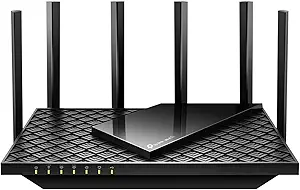
TP-Link AXE5400 Tri-Band WiFi 6E Router (Archer AXE75), 2025 PCMag Editors’ Choice, Gigabit Internet for Gaming & Streaming, New 6GHz Band, 160MHz, OneMesh, Quad-Core CPU, VPN & WPA3 Security
This router stands out for its tri-band WiFi 6E technology that offers up to 5400 Mbps combined speeds, including the new 6 GHz band, which is vital for future-proofing homes with many high-bandwidth devices. Compared to the NETGEAR Nighthawk BE9300, it provides more advanced security features like WPA3 and a dedicated VPN server, making it better suited for security-conscious users. The quad-core CPU and 512 MB RAM ensure long-term performance even as your network demand grows. A notable tradeoff is the higher price and slightly more complex setup process, but the enhanced capacity and bandwidth justify it for tech-savvy households. This pick makes the most sense for households planning to upgrade to multi-device, high-speed environments in the next few years.
Pros:- Supports the latest WiFi 6E with a dedicated 6 GHz band for ultra-fast speeds
- Powerful 1.7 GHz quad-core CPU and 512 MB RAM ensure reliable long-term performance
- Supports OneMesh for seamless whole-home coverage
Cons:- Higher price point compared to older or simpler routers
- Setup process can be more complicated, requiring familiarity with advanced networking
Best for: Tech enthusiasts and early adopters with future-proofing needs who want top-tier speed and security.
Not ideal for: Casual users looking for simple plug-and-play solutions; setup complexity and cost may be prohibitive.
- Maximum WiFi Speed:5400 Mbps
- Frequency Bands:Tri-Band (6 GHz, 5 GHz, 2.4 GHz)
- Processor:Quad-Core 1.7 GHz
- Memory:512 MB
- Security Protocol:WPA3
- Coverage:Whole-home coverage
- VPN Support:Yes
- Number of Antennas:8
- Warranty:2 years
Bottom line: This router is ideal for households wanting a future-proof, high-performance network with strong security features.
NETGEAR WiFi 6 Router 4-Stream (R6700AX) – Router Only, AX1800 Wireless Speed (Up to 1.8 Gbps), Covers up to 1,500 sq. ft., 20 Devices – Free Expert Help, Dual-Band
This router makes a compelling case for cost-conscious users wanting to upgrade to WiFi 6, supporting speeds up to 1.8 Gbps and handling up to 20 devices with reliable coverage over 1,500 sq. ft. It’s simpler to set up than the TP-Link AXE75, and the dual-band design provides solid future-proofing for most homes. Compared with the TP-Link AX5400 AXE75, it offers less overall speed and fewer advanced features but remains an excellent choice for households that prioritize affordability while still upgrading to the latest WiFi standard. A key tradeoff is the limited coverage area and slightly slower speeds, which could be restrictive for larger or more device-heavy homes. This router is best suited for small to medium homes wanting a straightforward, reliable upgrade to WiFi 6 without breaking the bank.
Pros:- Affordable upgrade to WiFi 6 with up to 1.8 Gbps speeds
- Simple setup with guided app instructions
- Supports up to 20 devices simultaneously
Cons:- Limited coverage area of about 1,500 sq. ft.
- Fewer advanced security features compared to higher-end models
Best for: Budget-conscious households seeking reliable WiFi 6 performance with manageable setup complexity.
Not ideal for: Large homes or high-demand users needing maximum speed and coverage; this model is more suited to smaller spaces.
- Maximum WiFi Speed:1.8 Gbps
- Coverage:Up to 1,500 sq. ft.
- Number of Devices:20
- Bands:Dual-Band
- Security Protocol:WPA3
- Ethernet Ports:4
- Setup Method:App
- Processor:Dual-Core 880 MHz
- Warranty:1 year
Bottom line: This router offers excellent value for small to medium homes ready to switch to WiFi 6, balancing speed, ease of setup, and cost.
NETGEAR Nighthawk WiFi 7 Router (BE9300) – Router Only, 9.3Gbps Wireless Speed, 2.5 Gigabit Internet Port, Tri-Band for Gaming, Covers 2,500 sq. ft., 100 Devices, VPN – Free Expert Help
This WiFi 7 router offers an impressive speed up to 9.3 Gbps across three bands, making it ideal for gamers, streamers, and smart homes increasingly demanding multi-device environments. It’s significantly faster than the TP-Link AXE75 and supports up to 100 devices over a large 2,500 sq. ft. area. The multi-gigabit wired ports and VPN support add to its appeal for security-minded and high-performance households. The main tradeoff is the high cost and the need for compatible internet plans and devices to fully leverage WiFi 7’s capabilities, which may be overkill for average users. This router makes the most sense for early adopters and power users seeking maximum speed and future-proofing.
Pros:- Supports WiFi 7 speeds up to 9.3 Gbps for ultra-fast connections
- Covers large areas up to 2,500 sq. ft. with 4 high-performance antennas
- Supports up to 100 devices with advanced MU-MIMO and OFDMA
Cons:- High cost compared to WiFi 6 models
- Requires WiFi 7 compatible devices and internet plans to maximize benefits
- Setup complexity for non-technical users
Best for: Gamer households, tech enthusiasts, and users with demanding, multi-device, high-speed networks.
Not ideal for: Casual or budget users; the high price and complex setup may not be justified for typical browsing and streaming needs.
- Maximum WiFi Speed:9.3 Gbps
- Coverage:2,500 sq. ft.
- Number of Devices:100
- Bands:Tri-Band WiFi 7
- Ethernet Ports:2.5 Gbps, 4x 1 Gbps
- Processor:High-performance
- Security:VPN support, WPA3
- Antenna Count:4
- Warranty:1 year
Bottom line: Best suited for early adopters and power users seeking maximum future-proof speed and extensive device support.
NETGEAR Nighthawk Modem Router Combo (CAX30) DOCSIS 3.1 Cable Modem and WiFi 6 Router – AX2700 2.7 Gbps – Compatible with Xfinity, Spectrum, Cox, and More – Gigabit Wireless Internet
This combo device simplifies future-proofing by integrating a WiFi 6 router with a DOCSIS 3.1 cable modem, supporting internet plans up to 2.7 Gbps, ideal for cable users wanting fewer devices and less clutter. It offers solid coverage of 2,000 sq. ft. and supports up to 25 devices, making it suitable for medium-sized homes. Compared to the TP-Link AX5400, it offers similar speeds but with integrated modem functionality, reducing hardware clutter. However, the setup can be more involved, and it’s limited to cable internet providers—less flexible for fiber or DSL users. This device is best for cable households seeking an all-in-one, future-ready solution that reduces equipment costs and complexity.
Pros:- Integrates DOCSIS 3.1 modem with WiFi 6 router
- Supports internet speeds up to 2.7 Gbps
- Fewer devices needed, reducing clutter
Cons:- Limited to cable internet providers like Xfinity, Spectrum
- Setup can be complex for non-technical users
- Less flexible if switching providers or upgrading to fiber
Best for: Cable internet users wanting a combined modem/router with WiFi 6 for future-ready speeds.
Not ideal for: Fiber or DSL users; incompatible with non-cable providers or those needing standalone routers.
- Maximum WiFi Speed:2.7 Gbps
- Coverage:2000 sq. ft.
- Devices Supported:Up to 25
- Modem Compatibility:DOCSIS 3.1
- Ethernet Ports:4 Gigabit
- Security Protocol:WPA3
- WiFi Generation:WiFi 6
- Setup:Web and App
- Warranty:1 year
Bottom line: An excellent all-in-one choice for cable households seeking future-proof speeds with minimal equipment fuss.
TP-Link AXE5400 Tri-Band WiFi 6E Router (Archer AXE75), 2025 PCMag Editors’ Choice, Gigabit Internet for Gaming & Streaming, New 6GHz Band, 160MHz, OneMesh, Quad-Core CPU, VPN & WPA3 Security
This router stands out for its tri-band WiFi 6E technology that offers up to 5400 Mbps combined speeds, including the new 6 GHz band, which is vital for future-proofing homes with many high-bandwidth devices. Compared to the NETGEAR Nighthawk BE9300, it provides more advanced security features like WPA3 and a dedicated VPN server, making it better suited for security-conscious users. The quad-core CPU and 512 MB RAM ensure long-term performance even as your network demand grows. A notable tradeoff is the higher price and slightly more complex setup process, but the enhanced capacity and bandwidth justify it for tech-savvy households. This pick makes the most sense for households planning to upgrade to multi-device, high-speed environments in the next few years.
Pros:- Supports the latest WiFi 6E with a dedicated 6 GHz band for ultra-fast speeds
- Powerful 1.7 GHz quad-core CPU and 512 MB RAM ensure reliable long-term performance
- Supports OneMesh for seamless whole-home coverage
Cons:- Higher price point compared to older or simpler routers
- Setup process can be more complicated, requiring familiarity with advanced networking
- Slightly larger physical size
Best for: Tech enthusiasts and early adopters with future-proofing needs who want top-tier speed and security.
Not ideal for: Casual users looking for simple plug-and-play solutions; setup complexity and cost may be prohibitive.
- Maximum WiFi Speed:5400 Mbps
- Frequency Bands:Tri-Band (6 GHz, 5 GHz, 2.4 GHz)
- Processor:Quad-Core 1.7 GHz
- Memory:512 MB
- Security Protocol:WPA3
- Coverage:Whole-home coverage
- VPN Support:Yes
- Number of Antennas:8
- Warranty:2 years
Bottom line: This router is ideal for households wanting a future-proof, high-performance network with strong security features.
TP-Link AX1800 WiFi 6 Router (Archer AX21 V5) – Dual Band Wireless Internet, Gigabit, Easy Mesh, Works with Alexa – A Certified for Humans Device, Free Expert Support
The TP-Link AX1800 stands out for delivering reliable WiFi 6 performance at a budget-conscious price. Compared with higher-end options like the TP-Link AX5400 AX73, it offers slightly lower speeds—up to 1.2 Gbps on 5 GHz—but still supports extensive device connectivity thanks to OFDMA technology. This makes it ideal for users who need a solid, future-proof home network without the premium cost, though it lacks the 6 GHz band that WiFi 6E routers offer. Its focus on security, easy setup with the TP-Link Tether app, and Alexa compatibility make it accessible for most homes. The main tradeoff involves slower speeds under heavy load compared to premium models, which could impact high-bandwidth activities. Best for small to medium homes or users upgrading from older WiFi standards seeking affordability without sacrificing future compatibility.
Pros:- Affordable price point delivering WiFi 6 speeds
- Supports all major ISPs with easy setup
- Works with Alexa and supports secure VPN features
Cons:- Limited to dual-band, no 6 GHz or WiFi 6E support
- Maximum speed capped at 1.2 Gbps, less ideal for heavy bandwidth users
- Coverage may be insufficient for very large homes
Best for: Budget-conscious homeowners or apartment dwellers wanting WiFi 6 support and mesh capability without high costs
Not ideal for: Heavy streamers or gamers needing ultra-high speeds and 6 GHz support, or large homes requiring extensive coverage beyond typical range
- Wi-Fi Standard:Wi-Fi 6 (802.11ax)
- Total Bandwidth:1.8 Gbps
- Antenna Count:4 high-gain antennas
- Ports:5 (Ethernet, USB)
- Coverage:Wide and reliable
- Security Protocols:WPA3, VPN support
Bottom line: This router is perfect for users seeking reliable WiFi 6 performance in smaller homes or apartments without a high price tag.
GL.iNet GL-BE6500 (Flint 3e) WiFi 7 Router, High-Speed WiFi w/VPN, 5 x 2.5G Ethernet Port for Fiber Optic Modem, Long Range Large Home, Business & Gaming Routers
The GL.iNet Flint 3e offers cutting-edge WiFi 7 technology, supporting speeds up to 680 Mbps on VPN connections and providing extensive coverage—up to 2,500 sq. ft.—making it ideal for large homes, small offices, or gaming setups. Unlike the TP-Link BE6500, which emphasizes mesh and security, this router excels in raw VPN speed and multi-device handling thanks to MLO, 4K-QAM, and multi-RU features. Its full interface, support for Wireguard, and fast LAN ports make it highly adaptable for tech-savvy users who want top-tier performance. However, it is more complex to set up and more expensive than WiFi 6 models. It’s best suited for users who prioritize future-proof WiFi 7 features and flexible deployment options over simplicity. Ideal for power users, gamers, or small businesses needing high VPN throughput and long-range coverage.
Pros:- Supports WiFi 7 with ultra-fast VPN speeds
- Excellent range and device capacity up to 2,500 sq. ft. and 90 devices
- Full interface with VPN, advanced security, and multi-link operation
Cons:- More complex setup compared to simpler WiFi 6 routers
- Higher price point reflecting its advanced features
- Limited availability and less proven in everyday home environments
Best for: Tech enthusiasts and professionals seeking the latest WiFi 7 features with high VPN speeds and broad coverage
Not ideal for: Casual users or homes with minimal device needs who do not require WiFi 7’s advanced capabilities
- Wi-Fi Standard:Wi-Fi 7
- Speed:Up to 680 Mbps VPN, 5764 Mbps total
- Coverage:Up to 2,400 sq. ft.
- LAN Ports:6 high-speed ports (2.5Gbps)
- Security:HomeShield, WPA3
- Antenna Count:6
Bottom line: This router is tailored for users who want the latest WiFi 7 technology with high VPN throughput and extensive coverage for future-proof homes.
TP-Link AX5400 WiFi 6 Router (Archer AX73)- Dual Band Gigabit Wireless Internet Router for Streaming, Long Range Coverage
The TP-Link AX5400 AX73 delivers impressive speeds up to 4.8 Gbps with a robust 6-antenna design, making it ideal for large homes, gaming, and 8K streaming. Compared to the AX1800 AX21, it offers significantly higher throughput and better range, thanks to advanced beamforming, high-power FEM, and MU-MIMO technology. Its extensive coverage—up to 2,400 sq. ft.—and ability to support numerous devices make it perfect for busy households. The device’s additional features like USB sharing and TP-Link HomeShield security ensure future-proofing and security. Its main drawback involves a slightly higher price and potential overkill for smaller, less demanding settings. Best suited for large households or those with heavy bandwidth demands who need a balance of speed, range, and device capacity.
Pros:- High-speed WiFi 6 with up to 4.8 Gbps throughput
- Supports extensive device count with MU-MIMO & OFDMA
- Long-range coverage with Beamforming and 6 antennas
Cons:- Higher price compared to basic WiFi 6 routers
- Overkill for small homes or light users
- Potential for heat buildup under heavy load
Best for: Large homes or households with multiple heavy users demanding fast, reliable WiFi across extensive areas
Not ideal for: Small apartments or users on a tight budget who need less coverage and speed
- Wi-Fi Standard:Wi-Fi 6 (802.11ax)
- Maximum Speed:Up to 4.8 Gbps
- Coverage:Up to 2,400 sq. ft.
- Antennas:6 high-gain antennas
- Ports:1 USB 3.0, multiple Ethernet
- Security Protocols:WPA3, HomeShield
Bottom line: This router provides exceptional speed and coverage for large, demanding homes or gaming setups ready for future WiFi technology.
TP-Link AX5400 WiFi 6 Router (Archer AX73)- Dual Band Gigabit Wireless Internet Router for Streaming, Long Range Coverage
The TP-Link AX5400 AX73 excels in providing ultra-fast speeds up to 4.8 Gbps, with a focus on extensive coverage—up to 2,400 sq. ft.—and supporting numerous devices simultaneously. Its advanced antenna technology, MU-MIMO, and Beamforming ensure reliable connections in large or device-dense environments, making it ideal for streaming, gaming, and smart home integration. Compared to the AX1800 AX21, it offers greater throughput and longer range, though at a higher price. Its robust security features, including WPA3 and TP-Link HomeShield, contribute to future-proof safety. The main tradeoff involves the premium cost and potential over-specification for smaller or less demanding homes. Best for large households or users requiring high-bandwidth, multi-device support.
Pros:- Fast WiFi 6 speeds up to 4.8 Gbps
- Supports many devices with MU-MIMO & OFDMA
- Reliable long-range coverage with advanced antennas
Cons:- Higher price point than entry-level routers
- Overkill for small or light internet use
- Slightly larger form factor and heat emission
Best for: Homeowners with large spaces and many users requiring high-speed WiFi for streaming and gaming
Not ideal for: Owners of small apartments or those with minimal device needs who seek affordability
- Wi-Fi Standard:Wi-Fi 6 (802.11ax)
- Speed:Up to 4.8 Gbps
- Coverage:Up to 2,400 sq. ft.
- Antennas:6 high-gain antennas
- Ports:1 USB 3.0, Ethernet ports
- Security Protocols:WPA3, HomeShield
Bottom line: This router is designed for large homes or busy households seeking high-speed, reliable WiFi with future-proof security.
TP-Link BE6500 Dual-Band WiFi 7 Router (BE400) – Dual 2.5Gbps Ports, USB 3.0, Covers up to 2,400 sq. ft., 90 Devices, Quad-Core CPU, HomeShield, Private IoT, Free Expert Support
The TP-Link BE6500 leverages WiFi 7’s latest technology, supporting speeds up to 5.76 Gbps and covering up to 2,400 sq. ft., making it ideal for ultra-fast gaming, streaming, and smart home integration. Its Multi-Link Operation (MLO), 6 antennas, and quad-core CPU outperform WiFi 6 models like the AX5400 AX73 in speed, latency, and device capacity—supporting up to 90 devices seamlessly. Its dual 2.5 Gbps ports and USB 3.0 add versatility for wired connections and media sharing. While more expensive, this router future-proofs your network for the latest devices like iPhone 16 Pro and Samsung Galaxy S24 Ultra. The main tradeoff is the higher cost and complexity, making it a best fit for users committed to WiFi 7’s capabilities. Ideal for tech-savvy users or households seeking the latest WiFi standard with maximum speed and coverage.
Pros:- Supports WiFi 7 with speeds up to 5.76 Gbps
- Excellent range up to 2,400 sq. ft. for many devices
- Dual 2.5Gbps ports and USB 3.0 for wired/media sharing
Cons:- Higher price compared to WiFi 6 routers
- More complex setup and configuration required
- Limited availability for early WiFi 7 adoption
Best for: Early adopters and tech enthusiasts wanting the best WiFi 7 experience for gaming, streaming, and smart home devices
Not ideal for: Casual households or budget-focused users not yet needing WiFi 7’s full potential
- Wi-Fi Standard:Wi-Fi 7
- Speed:Up to 5.76 Gbps
- Coverage:Up to 2,400 sq. ft.
- Ports:Dual 2.5Gbps, USB 3.0
- Antenna Count:6
- Security:HomeShield, WPA3
Bottom line: This router is designed for future-proof homes where maximum speed, device capacity, and latest WiFi 7 features are a priority.
TP-Link Dual-Band BE3600 Wi-Fi 7 Router Archer BE230
The TP-Link Archer BE230 stands out as a compelling choice for those wanting to future-proof their home with Wi-Fi 7 technology. Its support for Multi-Link Operation (MLO) and advanced 4K-QAM modulation means significantly increased data capacity and lower latency, making it ideal for streaming 4K/8K content and gaming. Compared with the NETGEAR WiFi 7 Router (BE9300), the BE230 offers a more streamlined setup and integrated HomeShield security, though it lacks the extensive multi-device capacity of the NETGEAR model. Its dual 2.5Gbps ports and quad-core processor deliver robust high-speed connectivity, but the absence of a dedicated 6 GHz band could limit peak performance when compared to tri-band Wi-Fi 6E options. This pick makes the most sense for tech-savvy homeowners seeking a reliable, high-capacity router that integrates seamlessly with smart home devices without overpaying for overly complex features.
Pros:- Supports Wi-Fi 7 with Multi-Link Operation for increased speed and reliability
- Dual 2.5Gbps ports for multi-Gigabit internet and device connections
- Easy setup with TP-Link Tether app and integrated HomeShield security
Cons:- Lacks the 6 GHz band found in Wi-Fi 6E routers, limiting peak capacity
- Coverage up to 2,000 sq. ft. may be insufficient for very large homes
- No tri-band support, which could enhance multi-device performance
Best for: Tech enthusiasts and early adopters who want a reliable, high-speed Wi-Fi 7 network with smart home integration.
Not ideal for: Users with large homes requiring extensive multi-device support or those needing Wi-Fi 6E/6 GHz bands for maximum future-proofing.
- Wi-Fi Generation:Wi-Fi 7
- Max Speed:2882 Mbps (5 GHz), 688 Mbps (2.4 GHz)
- Ports:2×2.5Gbps, 3×1Gbps LAN
- Processor:Quad-core 2.0 GHz
- Coverage:Up to 2,000 sq ft
- Antennas:4 internal antennas
- Security:HomeShield, VPN, EasyMesh
- Compatibility:Works with Alexa, Google Assistant
- Setup:App-based with TP-Link Tether
Bottom line: This router is ideal for users seeking cutting-edge Wi-Fi 7 speeds and smart home security in a straightforward setup.

How We Picked
The routers in this roundup were selected based on their ability to deliver high performance, scalability, and future-proof features for home networks. Key criteria included the latest WiFi standards (WiFi 6E and WiFi 7), multi-device handling capacity, advanced security, and ease of integration with existing smart home setups. We prioritized models with robust hardware, long-range coverage, and support for multi-gig internet plans. The ranking reflects a balance between cutting-edge technology and practical value, favoring devices that will remain relevant as home networking demands grow over the next several years.Factors to Consider When Choosing Best Premium Routers For Future Proof Homes
When selecting a premium router for a future proof home, it’s essential to consider several factors beyond just raw speed. First, evaluate the WiFi standards supported; WiFi 6E and WiFi 7 are the most current and future-ready options, offering broader spectrum and higher capacity. Next, consider coverage area and device handling: a router with multi-band support and multiple streams can better serve a large, device-heavy household. Security features like WPA3 and integrated security services add vital protection for your data. Additionally, look at ports and scalability options, such as multi-gig ports and mesh compatibility, to ensure your network remains flexible and capable of handling increasing demands. Don’t forget to factor in ease of setup and ongoing management, which can significantly impact your overall experience.Latest WiFi Standards and Spectrum Usage
Prioritizing routers with WiFi 6E or WiFi 7 support ensures your network can handle future bandwidth demands and additional devices. WiFi 6E introduces the 6GHz band, reducing congestion and boosting speeds, especially in crowded environments. WiFi 7 promises even higher throughput and lower latency, ideal for demanding applications like 4K streaming, VR, and smart home integrations. Choosing a device with these standards secures your investment for years ahead, although it often comes with a higher initial cost and compatibility considerations with older devices.
Coverage and Device Capacity
A larger home or a device-rich environment demands a router with extensive coverage and high device handling capacity. Multi-band and quad-stream routers distribute traffic efficiently, minimizing bottlenecks when multiple users stream, game, or work simultaneously. Mesh compatibility can extend coverage further, but it complicates setup and adds cost. Be wary of models that advertise high speeds but fall short on real-world coverage or device support, as these can limit your network’s scalability over time.
Security and Management Features
Security features like WPA3 encryption and integrated security services such as HomeShield are essential for protecting your smart home ecosystem. Some premium routers also offer advanced options like VPN support and automatic firmware updates, which enhance privacy and reduce management headaches. Ease of setup and app-based management tools make ongoing control more accessible, especially for users who prefer not to deal with complex configurations. In the long run, security and manageability features help maintain your network’s integrity and smooth operation.
Ports and Future Expansion
Multi-gig ports (2.5Gbps or higher) support fast wired connections to NAS devices, gaming consoles, or smart home hubs. USB ports facilitate media sharing and device management, adding versatility. Compatibility with mesh systems and support for MLO (Multi-Link Operation) ensures your network can grow without replacing the core router. Consider your current and future device lineup to avoid bottlenecks or the need for frequent upgrades, especially if you plan to integrate fiber-optic or multi-gig internet plans.
Ease of Use and Ongoing Support
While high-end routers offer sophisticated features, they should also be straightforward to set up and manage. Look for models with comprehensive app support, clear firmware update processes, and reliable customer service. Devices that include automatic updates and security patches reduce ongoing maintenance. If you’re less tech-savvy, prioritizing user-friendly interfaces can save time and frustration, ensuring your investment remains a benefit rather than a burden.
Frequently Asked Questions
Will a WiFi 6E or WiFi 7 router be compatible with my existing devices?
Most current devices are compatible with WiFi 6E and WiFi 7, but some older gadgets may not support these standards. Upgrading to a future-proof router ensures your network is ready for new devices, but you might need to upgrade your smartphones, laptops, or smart home hubs over time to take full advantage of the latest speeds and features. Compatibility is generally backward compatible, so older devices will still work, albeit at lower speeds. Investing in these standards future-proofs your home by making it easier to adopt new tech as it becomes available.
How much should I expect to spend on a high-end, future-proof router?
Premium routers with WiFi 6E or WiFi 7 support typically range from around $300 to over $600, depending on features like multi-gig ports, security, and mesh compatibility. Spending more usually grants access to more advanced hardware, longer coverage, and better security features, which are worth it if you want a network that remains relevant for years. However, it’s wise to balance your actual need for speed and coverage against the cost to avoid over-investing in features you may not utilize immediately. Think of it as a long-term investment in your home’s connectivity infrastructure.
Are multi-band routers always better than dual-band options?
Generally, multi-band routers—especially tri-band or quad-band models—offer better performance for busy households with many devices. They distribute traffic across multiple frequency bands, reducing interference and congestion. However, they tend to be more expensive and complex to configure. For small households or those with fewer devices, dual-band routers may suffice and save money. The choice depends on your home’s size, number of connected devices, and whether you prioritize maximum speed and stability.
Should I prioritize security features over raw speed?
Security features like WPA3 and integrated threat management are essential, especially in homes with smart devices and sensitive data. While raw speed offers immediate benefits for streaming and gaming, neglecting security can expose your network to threats and compromise your privacy. Ideally, choose a router that balances high performance with robust security, ensuring your home remains fast, functional, and protected. Premium models typically include automatic updates and advanced security settings, making this a worthwhile tradeoff.
Is mesh compatibility necessary for future proofing?
Mesh compatibility allows your router to expand coverage easily as your home’s layout or device load grows, making it a strong feature for future proofing. However, it adds complexity and cost, and not all mesh systems are equally seamless. If your home is large or has challenging layouts, investing in a mesh-compatible router can prevent the need for frequent replacements or additional extenders. For smaller or straightforward spaces, a high-performance single router might suffice, but mesh readiness provides scalability for long-term growth.
Conclusion
For most buyers, the TP-Link AXE5400 Tri-Band WiFi 6E Router offers the best balance of performance and future readiness, making it ideal as the overall top choice. Those seeking the fastest speeds and cutting-edge features should consider the NETGEAR Nighthawk WiFi 7 Router (BE9300), especially if their internet plan supports multi-gig speeds. Beginners or less tech-savvy users might prefer models with simplified management, like the TP-Link AX1800 Archer AX21. For larger homes or smart home integrations, investing in mesh-compatible options such as the TP-Link BE6500 ensures your network can scale smoothly. Ultimately, the right choice depends on your current needs and long-term plans.